

Introduction
Do you want to learn the best data recovery software for Windows and Mac users?
The best photo recovery app makes recovering lost files and folders on your computer, mobile device, or storage medium straightforward. Anyone who has suffered data loss will tell you it is very stressful. Whether due to hardware or software failure, unintentional deletion, or cybercrime. Businesses save a large portion of their critical information on hard drives or cloud backups. You may regularly save everything to a USB stick or an external hard disk.
Several data backup software options can make the photo recovery process relatively simple and easy to do. However, what you need is a dedicated and perfect data recovery tool to help restore your missing data due to a hard drive crash or corrupted drive.
Part 1: Reasons and What Users Commonly do for Data Loss:
Data loss is the most severe problem any business may face. It is an occurrence in which an organization loses data, leaving the information useless or irrecoverable. There are several causes of data loss. Some result from human responsibility, while others result from technological factors.
- Human Error: Human mistakes are the most prevalent source of data loss, which is why it ranks first on our list. A misplaced keystroke at any given time is one of the most common causes of data loss. Even basic actions such as sipping your morning coffee while working might result in the loss of corporate data if you are not cautious. Yes, one of the leading causes of data loss is liquid spills. Another cause of data loss is inefficient processes and insufficient information storage.
- Theft: Theft is another prevalent reason for data loss. Losing business computers, USB flash drives, or mobile phones may cause significant problems when the significance of data loss prevention becomes apparent. Backup files on the cloud or other hard drives are the only methods to keep your stolen data secure.
- Software Corruption: Software corruption is a frequent source of data loss for many businesses. It may occur as a result of outages or botched data transmission. Massive data transfers might backfire if you damage your file or get detected by your antivirus software. One method of preventing data loss is to keep your system up to date.
- Computer Viruses: When it comes to frequent sources of data loss, you cannot ignore viruses. A virus is a kind of malware designed to steal, erase, or encrypt data on your device. “What are the reasons for data loss?” asks any security firm. You’ll be directed to a virus as the source of the problem.
- Hardware Impairment: Damaged hardware is one of the most prevalent reasons for data loss. This occurs for a variety of reasons. On the one hand, there is the human aspect, with individuals abusing hard drives by improperly connecting them or exposing their moving components to severe temperatures. You may potentially harm your storage device by exposing it to corrupted data.
- Power Failure: A typical cause of data loss is a power outage. A sudden power outage brings a slew of issues. Data saved may get lost. Data in the process of being saved may also get damaged, and it might impact existing data since unexpected power outages can impair your hard drives and systems.
Part 2: Introduction of Wondershare Recoverit?
Wondershare Recoverit data recovery software searches your system for lost file paths. Wondershare launched Recoverit in 2003 and has continued to produce new versions to become one of the top data recovery solutions. This straightforward program, accessible for both macOS and Windows, can recover documents, images, videos, audio files, and emails. Recoverit is capable of data recovery for over 1000 files from various sources, including USBs, SD cards, desktops, particular folders, and formatted partitions. You can even recover data from cell phones and digital cameras, which is impressive.
Download Wondershare Recoverit and try it for free now!

Part 3: How to Recover a Particular File with Wondershare Recoverit?
This guide will show you how to recover a deleted file from a Windows computer, while Mac users should download the data recovery software for Mac and follow the same steps.
Step 1: Start Recoverit Data Recovery and then choose “Deleted Data Recovery” to recover deleted files from your computer.
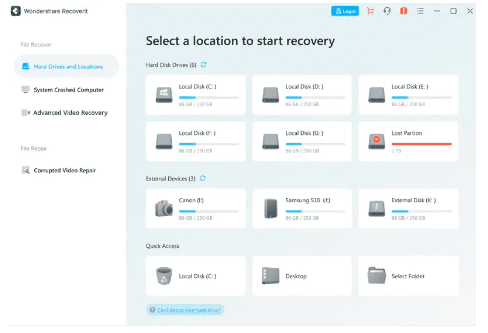
Step 2: Then, choose the hard disk drive from which your data were destroyed and click “Start” to scan and search for lost data.
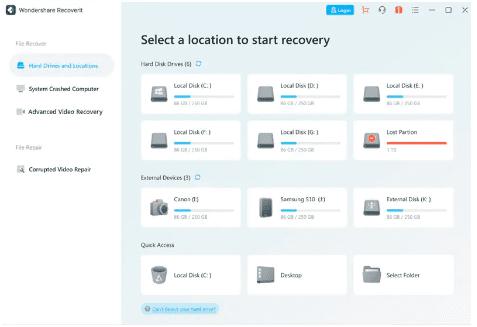
Step 3: After running the scan, you can preview some of the restorable files. If you cannot recover your data after running the scan, you can rerun the scan with the “All-around Recovery” mode, which can deep-scan your computer hard drive and search for more files. It will take longer to locate additional files, however.
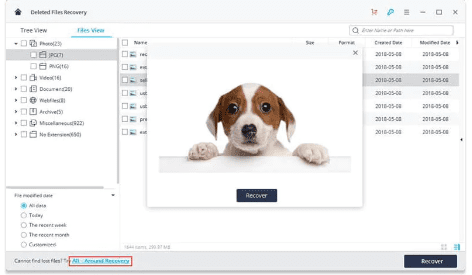
Step 4: After the scan, preview all the recovered files and recovered photos. Finally, pick the files you want, and click the “Recover” button.

Please store any recoverable data on a secure storage device to prevent data loss. You can recover lost data from Dropbox with the Recoverit data recovery program in just a few simple steps.
Part 4: Standout Features of Wondershare Recoverit
The offered features may vary depending on your chosen plan, so check out the price section.
- It employs a sophisticated data recovery algorithm and intelligent and deep scanning technologies. You may also use video fragment technology to recover videos you never imagined seeing again.
- You can scan all sorts of memory cards, hard disks, detachable drives, flash drives, and digital cameras and camcorders, in addition to retrieving data from your recycle bin.
- Wondershare Recoverit is safe and comes with a virus-free guarantee, making it excellent for recovering data after a virus or malware attack.
Part 5: Difference from other data recovery software?
Every person and business should have data recovery software with various possible technological concerns ranging from viruses to system breakdowns. Not every option will satisfy all of your requirements. Let’s look at all that Wondershare Recoverit offers compared to other recovery software.
- Recoverit is effortless to use with an intuitive user interface
- The customer support of this software is highly responsive
- It supports the recovery of files in multiple formats.
- It is useful for small, medium, and large organizations.
- It can work on Windows and Mac operating systems.
Final Words
In conclusion, data collection and analysis are the gasoline that keeps the motors of many businesses operating. Many companies will do whatever lengths to protect their customers’ data. Thus, finally, we can declare that Wondershare Recoverit is a secure and convenient data recovery program on both PCs and Macs.