
Introduction
My dear friend, have you ever seen a stunning YouTube thumbnail and wished you could keep it forever? That little preview image packs a punch it teases the video’s magic and beckons you to click.
Whether you’re a student gathering visuals for a project or a content creator sprucing up your portfolio, you deserve a hassle‑free way to save these snapshots in crisp, high definition.
In this tutorial, I’ll walk you through an effortless, web‑based method with no installations, no hidden fees so you can grab any YouTube thumbnail in seconds. Let’s dive in together!
What Is a YouTube Thumbnail?
Ah, the YouTube thumbnail it’s like the movie poster for each video. Before the play button ever appears, this image tells you what you’re in for: a cooking demo, a thrilling vlog, or maybe a tutorial.
Creative creators add text overlays, vibrant colors, and expressive faces to make their thumbnails impossible to ignore.
Why Are Thumbnails Important?
- First Impressions Matter: Thumbnails decide whether someone stops scrolling or moves on. A compelling design can boost your click‑through rates.
- Brand Recognition: Consistent colors, fonts, and styles make your videos instantly identifiable.
- Storytelling Teasers: A well‑crafted thumbnail sets the scene, hints at the plot, and builds curiosity.
By using a trusted YouTube Thumbnail Grabber, you ensure you always have the highest‑quality version of that visual gem.
Why Do People Download YouTube Thumbnails?
Good question, my dear! Here are a few heartfelt reasons:
- School Projects: Students include eye‑catching thumbnails in slideshows or reports.
- Blog & Article Previews: Writers use thumbnails to enrich their posts with visual previews.
- Design Inspiration: Aspiring graphic artists study thumbnail layouts to sharpen their skills.
- Fan Collections: Sometimes, you just love a creator’s style and want to keep their artwork!
Downloading these images in HD means you get every detail, every vibrant color, without blur or pixelation.
Is It Legal to Download Thumbnails?
Rest easy downloading thumbnails is generally fine for personal or educational use. Just remember:
- Don’t claim the image as your own art.
- Avoid selling or using it in paid advertisements.
- Always credit the original creator if you share it publicly.
Respecting others’ work keeps our online community friendly and creative!
How to Download YouTube Thumbnails Instantly – Step by Step
- Copy the Video Link
Head to YouTube, open your favorite video, and copy its URL from the address bar or via the “Share” button. - Open the Thumbnail Grabber
Go to https://youtubethumbnailgrabber.app/ in your browser. - Paste & Fetch
Paste your copied link into the input box and click “Download.” - Select Your Resolution
You’ll see options ranging from 120×90 up to HD 1280×720 or even full HD where available. Choose the size that suits your needs. - Save the Image
Right‑click the preview and select “Save image as…” Voila! Your thumbnail is now on your device.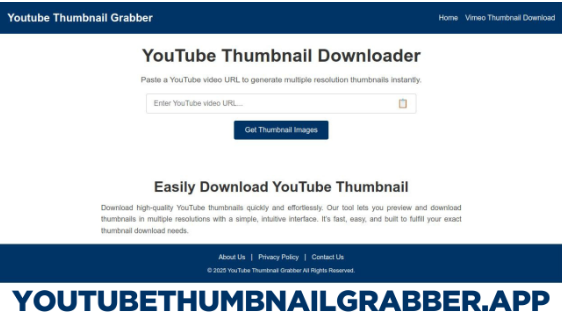
Use a Mobile App for Faster Access
If you’re often on the go, darling, mobile apps make life sweeter:
- Thumbnail Grabber HD: Simple interface, lightning‑fast downloads.
- YT Thumbnail Downloader: Offers batch downloads and favorite lists.
- ThumbSave App: Direct share to messengers or social media.
Just copy your video link, open the app, and tap “Download.” It’s as easy as texting a friend!
Hey there, my friend! You can now grab any Vimeo thumbnail in stunning HD right here just head over to our free Vimeo Thumbnail Downloader tool (Click here), paste your Vimeo video URL into the box, click “Get Thumbnail,” and instantly download the image in multiple resolutions (from 240×135 up to full HD) without installing a thing .
Tips for Getting the Best Thumbnails
- Always Pick HD: HD versions retain every detail and color.
- Favor Custom Thumbnails: Creators design these to pop grab them for added flair.
- Stable Connection: A steady internet link ensures images load fully without glitches.
- Clear Cache: If you ever see a broken preview, clear your browser cache and try again.
Creative Ways to Use Your Downloaded Thumbnails
Oh, the fun you’ll have! Try these ideas:
- Create a YouTube thumbnail collage showcasing your top channels.
- Study color and layout to design your own thumbnails with flair.
- Include thumbnails in school presentations to make slides come alive.
- Share a fan‑made gallery on your blog or Instagram.
What to Do If a Thumbnail Won’t Download
Don’t worry, my friend, it happens! Try these fixes:
- Ensure the video is public; private or deleted videos won’t work.
- Switch to a different thumbnail downloader site or app.
- Clear your browser’s cache or switch browsers.
- As a last resort, take a screenshot and crop the image though you’ll lose some resolution.
Stay Safe While Downloading
- Use only trusted websites or official app stores.
- Avoid clicking on suspicious pop‑ups or ads.
- Read user reviews before installing any new app.
- Keep your antivirus software up to date.
My Final Thoughts
There you have it, my dear! With these simple steps and friendly tips, you can download YouTube thumbnails in HD faster than you can say “cheese.”
Head over to the YouTube Thumbnail Grabber right now, and start saving those gorgeous previews for your next creative adventure. Happy downloading!