
Most small online stores start the same way: a phone, a kitchen table and a window. That setup can produce good product photos, but it often produces soft, grainy or small ones instead. Shoppers can’t touch the product, so the photo does the job a shop counter used to do. Here is how small sellers can get sharper product photos, from the shot itself to the cleanup afterwards.
Why do blurry product photos cost sales?
Blurry product photos cost sales because shoppers judge quality by what they can see. If the stitching, the texture or the label is unclear, a shopper has to guess, and many leave instead of guessing. Soft photos also make a store look less established next to competitors with crisp images.
Image size matters too. Marketplaces let shoppers zoom into product photos, and zoom only works well when the image has enough pixels. Amazon, for example, enables zoom on images that are at least 1000 pixels on the longest side, and Shopify recommends square product images of 2048 × 2048 pixels. Rules change, so check the current guidelines of the platform you sell on.
What makes phone product photos look bad?
Phone product photos usually look bad for four reasons:
- Dim indoor light. Indoors, the phone raises sensitivity to brighten the photo, which adds grain, and slows the shutter, which adds blur.
- Missed focus on close-ups. Phones struggle to focus very close to small items such as jewelry, labels and soap bars.
- Digital zoom. Zooming in to fill the frame crops the image and throws away pixels.
- Compression. Sending photos through a messaging app or downloading them from social media shrinks and compresses them.
How do you take sharper product photos with a phone?
You take sharper product photos with a phone by giving it more light and holding it still. These habits cost nothing:
- Shoot next to a window in daylight, with the window to the side of the product. A sheet of white paper on the other side fills in shadows.
- Use a stand or prop the phone against books. A steady phone allows a slower shutter without blur.
- Tap to focus on the product, then step back a little if the phone can’t lock focus. Crop later instead of using digital zoom.
- Clean the lens. A smudged lens softens the whole photo and makes highlights glow.
- Shoot several frames of each angle and keep the sharpest.
- Transfer the originals with a cable, AirDrop or cloud backup, not through a chat app.
How can AI fix product photos you already took?
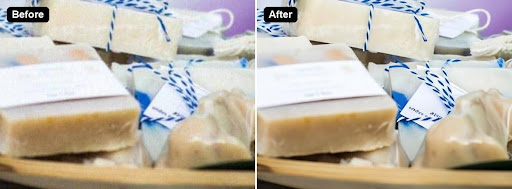
AI photo enhancement can fix product photos that are a little soft, grainy or small. It rebuilds detail that blur, noise and compression wiped out, then cleans up edges, which is something a sharpening slider can’t do. A sharpening filter only adds contrast to edges that are already there.
The process takes about a minute per photo. With a browser-based photo enhancer such as Clarpex, for example, you upload a JPG, PNG or WebP, let the AI rebuild the detail, and compare the result with the original on a before/after slider before you download it. The same kind of tool can also enlarge a small image so it meets a marketplace’s size requirement, replace a messy background with a plain one, or remove glare from shiny packaging.
Before you upload an enhanced photo to your store, check labels, stitching and edges at full size. Original photo: Wikimedia Commons, CC0.
What should AI never change in a product photo?
AI should never change what the product actually looks like. Marketplaces require photos that represent the item accurately, and customers return items that don’t match the pictures. Keep these rules:
- Fix the photo, not the product. Removing blur, grain and a cluttered background is fine. Changing the color, the shape, the size or a flaw of the item is not.
- Check text and logos. AI can redraw small text so it looks right but says something slightly different. Compare labels, ingredient lists and sizes with the real product.
- Keep colors true. Compare the enhanced photo with the item under daylight, especially for clothing, cosmetics and paint.
- Keep the original. Save the unedited photo, in case a customer or a marketplace asks.
When is a reshoot better than a fix?
A reshoot is better than a fix when the photo is badly blurred, very dark or taken from the wrong angle. AI enhancement improves mild blur, low resolution and noise a lot. It can’t recover a product that is a smear of motion blur, and it can’t add an angle you never shot. If the product is still on your shelf, ten minutes by a window usually beats any fix.
A quick checklist for small sellers
- Shoot by a window, with the phone on a stand.
- Tap to focus, avoid digital zoom, and take several frames.
- Move originals off the phone without compression.
- Enhance soft or grainy photos, and enlarge small ones to the marketplace size.
- Compare labels, colors and details with the real product.
- Keep the originals.
Clear photos won’t sell a product nobody wants. They do make sure the products people want aren’t skipped because of a blurry thumbnail.