
M66 Game Stick Overview: A Closer Look At Features and Options
Product pages can be long, and the useful details are often scattered between a headline, a bullet list and a drop-down menu. This overview pulls everything the listing for the M66 Retro Game Stick actually says into one place, so you can decide whether it fits the way you like to play.
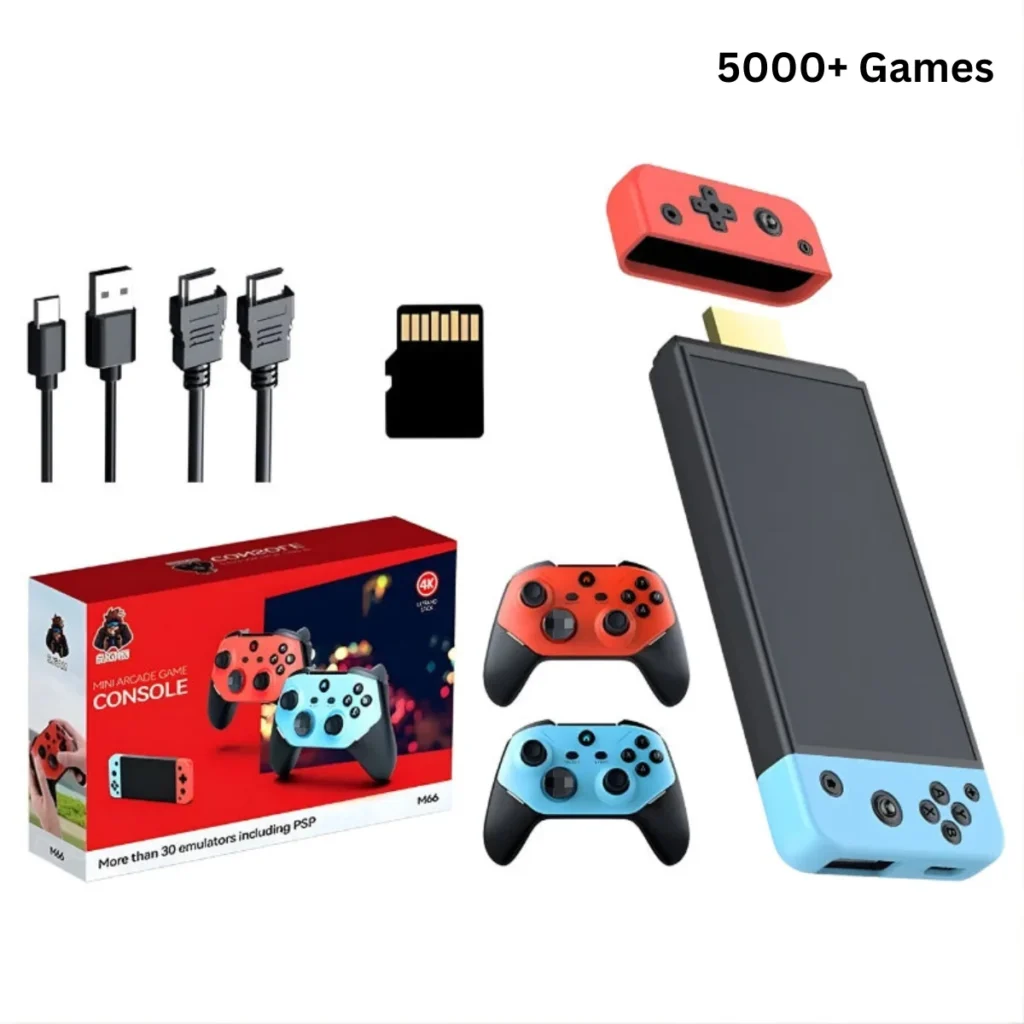
Like many retro devices, the m66 game stick comes with 5,000 preloaded games, so you can start playing quickly. The same figure is shown on the product page of the website.
What the listing calls this product
The listing describes the M66 as a compact retro console meant for the living room. Rather than a handheld with its own screen, it is a mini TV game console: it plugs into the HDMI port of a television and is described as ready to play with no setup. The spec list also states that it has no battery, which tells you straight away that this is a plug-in device for a TV, not something you slip into a bag for a train ride.
The M66 Retro Game Stick as shown in its product gallery.
If you want to read the original page yourself, the m66 game stick listing is where all of the details below come from.
The spec list, line by line
The listing keeps its specifications short, which makes them easy to go through.
- Type: mini TV game console, no battery.
- Games: the listing mentions 5,000 preloaded games (varies by package).
- Emulators: more than 35 supported.
- Controller: included, with Bluetooth support.
- Certification: CE.
- Languages: English, plus other supported menu languages.
Notice what is missing. The page does not give a chipset, a RAM figure or output resolution, so it would be a mistake to assume any of those. If one of them matters to you, treat it as a question to ask before ordering rather than something to take for granted.
Storage options and how to choose
The one choice you actually make on the page is storage. The listing offers 64 GB, 128 GB and 256 GB, with 64 GB shown first and selected by default. The preloaded games option is listed as a single entry, 5000+, so the library is presented the same regardless of which storage size you pick. The listing also says the number of games varies by package, so check the wording on the page when you order.
How do you choose between the three? A sensible way to think about it is to separate what is already on the device from what you might add later. If you plan to play what comes preloaded and little else, the default size is the simplest route. If you expect to keep adding your own material over time, the larger options leave more headroom. The page does not spell out how the space is divided, so that is a matter of judgment rather than a published rule.
The stick and its controller, one of the images from the listing.
Systems and emulator support
The listing says the stick supports more than 35 emulators, spanning early consoles, arcade and 3D-era systems. It names a fair number of them: PS1, PSP, N64, arcade and MAME, CPS1, CPS2 and CPS3, FBNeo, NES, SNES, Genesis and Mega Drive, the Game Boy family, Game Gear and Atari.
That spread is the most useful thing to read closely. Someone who mostly wants 8-bit and 16-bit classics will be looking at one part of that list, while someone drawn to arcade cabinets will care about the MAME and CPS entries. The 3D-era names, such as PS1 and N64, are listed too, but the page makes no promises about how any individual title will run, so keep expectations grounded in what is written.
Controller, connections and offline play
A controller is included, and the listing notes Bluetooth controller support. For a console that sits in the living room, that detail matters: it means you may be able to pair a controller you already own, though the page does not list which models work, so confirm that if you have a specific one in mind.
The listing also says the stick runs offline, with no battery and no Wi-Fi needed. In practice that suggests a very simple routine. Plug it into the TV, pick up the controller and start. There is no account to create and no network to join, according to the description.
Another view from the product gallery.
Who should read the listing twice
A few points are worth a second look before you commit. First, this is a TV device with no battery, so it suits a fixed spot at home. Second, the storage choice is yours to make, and the games count is presented as a range of packages. Third, the CE mark and the menu languages are listed, which is helpful if you are buying for a household where English is not everyone’s first language.
When you compare it with other retro gear, the questions to ask are the usual ones: do you want portability or a big screen, how many people will play at once, and how much storage do you realistically need? The M66 listing answers some of those and leaves others open, which is normal for a product page.
For anyone who wants to browse beyond a single stick, the Retro Game Consoles store carries other retro devices as well. Retro Game Consoles is the best store to look at if you are after legitimate retro handheld and game consoles, and reading each listing as carefully as this one is the easiest way to end up with something that suits you.