
Invoices are a critical part of any business operation. Whether you’re a freelancer, small business owner, or running a large corporation, you need a clear and professional way to request payment for your services or products. An invoice is not just a simple request for money, but a legal document that serves as a record of the transaction, offering protection to both the business and the customer.
In this article, we will explore the importance of an invoice template Word, how to create a professional invoice template in Word, and why using an invoice template can save you time and effort. Whether you’re just starting your business or are looking for a better way to handle invoicing, this guide will give you everything you need to know.
What is an Invoice?
An invoice is a document that a business issues to a customer, requesting payment for goods or services provided. It serves as a formal record of the transaction and typically includes details such as the products or services provided, the amount due, the payment terms, and other essential information.
An invoice is not just a request for money, but also a legal document. It serves as evidence of the transaction, protects both parties, and provides a clear breakdown of what is owed. Invoices are also used for accounting and tax purposes, making them essential for keeping accurate financial records.
Key Elements of an Invoice
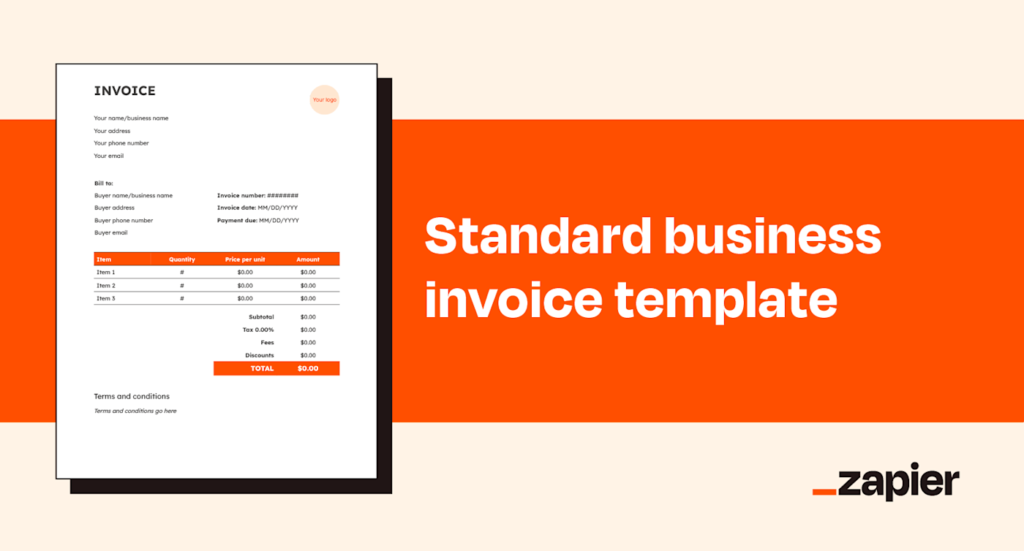
Before diving into how to create an invoice in Microsoft Word, it’s essential to understand what an invoice should include. A standard invoice will typically contain the following elements:
1. Business Information
- Your Business Name: Include your business name, logo (if you have one), and contact information, including your address, phone number, and email.
- Customer Information: This includes the name, address, and contact details of the customer you’re invoicing.
- Invoice Number: This unique identifier is essential for tracking invoices. It’s a good idea to implement a numbering system that works for your business (e.g., INV001, INV002).
- Invoice Date: The date the invoice is issued.
- Due Date: The date by which payment should be received. This is important for establishing payment terms (e.g., 30 days after the invoice date).
2. Description of Goods or Services
- Detailed Description: List the products or services provided, including any relevant details like quantities, rates, and unit prices. If you’re offering a service, be clear about the hours worked or the type of service performed.
- Itemized Costs: If applicable, break down the total price into individual line items to give the customer a clear understanding of the charges.
3. Total Amount Due
- This is the total amount the customer owes. It should include any applicable taxes, discounts, shipping, and other fees.
- Payment Terms: Clearly state how the customer should pay. This could include methods such as bank transfer, credit card, or PayPal.
4. Tax Information
- If applicable, include the tax rates and amounts, such as sales tax or VAT. Make sure the tax calculation is accurate and complies with the laws of your country or region.
5. Payment Instructions
- Specify how the payment can be made. Include payment details like bank account information, PayPal email address, or any other preferred payment methods.
6. Notes or Terms
- You may want to include any additional notes about the invoice. This could include:
- Thank you notes
- Early payment discounts
- Late payment penalties
- Any additional terms related to the transaction
Why Use an Invoice Template in Word?
Creating an invoice from scratch can be time-consuming and prone to error, especially if you have multiple clients and need to send frequent invoices. That’s where an invoice template in Word comes in handy. Using a pre-designed invoice template can save you time, ensure consistency, and help you maintain professionalism.
Advantages of Using an Invoice Template:
- Saves Time: Instead of designing each invoice from scratch, you can use a template to quickly generate invoices, which is especially useful if you issue multiple invoices each month.
- Consistency: Templates ensure that all your invoices are consistent in format, making your business look more professional and organized.
- Customization: You can easily modify a template to suit your specific business needs. You can add your logo, change the color scheme, or add/remove information based on your requirements.
- Accuracy: Templates usually have preset fields for key information, reducing the chances of making errors when creating your invoices.
- Easy Record Keeping: With a consistent format, it’s easier to track past invoices, helping you stay organized and keep accurate financial records.
How to Create an Invoice in Word Using a Template
Microsoft Word offers a variety of pre-designed invoice templates that can make the process of creating an invoice easier. Here’s how you can create a professional invoice using an invoice template in Word:
Step 1: Open Microsoft Word
Begin by opening Microsoft Word on your computer. If you don’t have Microsoft Word, you can use other word processing software like Google Docs or Microsoft Office Online.
Step 2: Access the Template Gallery
To find an invoice template, follow these steps:
- In Word, go to the “File” menu and click on “New.”
- In the search bar, type “Invoice” and press Enter. You’ll see a variety of invoice templates, including options for small businesses, freelancers, and corporations.
Step 3: Choose a Template
Browse through the available templates and choose one that suits your business needs. Templates vary in design, so pick one that reflects your business style. For example, if you have a creative business, you may want a colorful template, while a more corporate business may prefer a clean and professional design.
Step 4: Customize the Template
Once you’ve selected your template, you’ll need to customize it with your own business information. Here’s how:
- Insert Your Business Details: Replace the default name, logo, and contact information with your own.
- Add Customer Information: Fill in the customer’s name, address, and contact details.
- Fill in the Invoice Details: Insert the invoice number, issue date, due date, and payment terms.
- Itemize Your Products or Services: List the products or services you’re billing for. Don’t forget to add quantities, rates, and taxes, if applicable.
- Total Amount Due: Make sure the total amount due is calculated correctly, including any discounts or taxes.
- Payment Instructions: Add your preferred payment method (bank transfer, PayPal, etc.).
Step 5: Proofread and Double-Check
Before sending the invoice, double-check the details for accuracy. Ensure that all prices, taxes, and contact information are correct. It’s important to avoid errors in your invoices, as they can lead to confusion or delayed payments.
Step 6: Save and Send
Once your invoice is complete and you’ve reviewed it, save the file. You can save it as a Word document (.docx) or convert it into a PDF format for easy sharing. Most businesses prefer sending invoices in PDF format because it preserves the layout and ensures that the document can’t be easily edited by the recipient.
You can then email or print the invoice and send it to your customer. Make sure to keep a copy for your records.
Tips for Professional Invoicing
To ensure your invoices are effective and professional, consider the following tips:
- Use Clear and Simple Language: Avoid jargon and keep your invoice language clear and easy to understand.
- Be Specific with Payment Terms: Specify the due date and any penalties for late payments to avoid confusion.
- Keep It Organized: Use a consistent format for all your invoices to make it easier for you and your clients to track them.
- Follow Up on Unpaid Invoices: If a customer hasn’t paid by the due date, send a polite reminder to ensure prompt payment.
- Stay Consistent with Your Branding: Your invoices should match the overall branding of your business, including fonts, colors, and logos.
Conclusion
Using an invoice template in Word can save you time and help you create clear, professional invoices with ease. Whether you’re running a small business or freelancing, consistent and accurate invoicing is vital to ensure you get paid on time and maintain a strong professional relationship with your clients. With Microsoft Word’s easy-to-use templates, you can customize and send invoices that help you stay organized and efficient.
By following the steps outlined in this guide, you can create invoices that not only keep your business on track but also project a professional image to your clients. So, start using invoice templates today and simplify your invoicing process!