
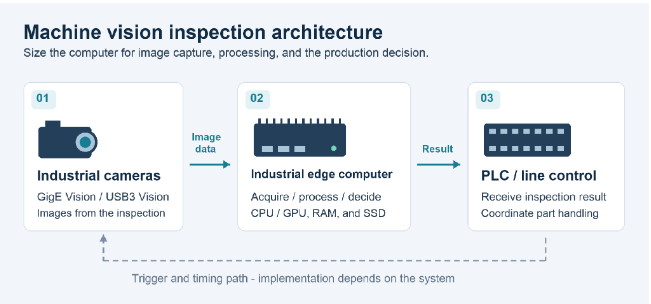
Machine vision uses cameras and software to inspect products. For example, a camera photographs a part, a computer checks the image, and production equipment acts on the result. The decision must arrive before the part moves past the point where action is possible.
An industrial edge computer does this processing near the production line. Choosing one means matching its connections, processing power, and design to the inspection task. These six factors explain what to check and why.
Illustrative system: cameras capture images, the edge computer checks them, and line controls act on the results. Trigger and timing arrangements depend on the system.
1. Camera Interfaces and Data Bandwidth
Start with camera connections and cable layout. GigE Vision uses Ethernet connections and suits longer cable runs. USB3 Vision often suits cameras close to the computer. Compare cable requirements and connection costs.
Bandwidth is how much data a connection can carry per second. Pixels are the tiny points making up an image; the pixel format determines how their data is encoded. For identical camera settings, estimate uncompressed image traffic by multiplying camera count, pixels per image, bytes per pixel, and images per second. Otherwise, calculate each camera separately and add the results. Leave room for transmission overhead and cameras sending images together.
Ethernet cameras may share one link from a network switch to the computer. USB ports may share a controller, the chip managing their data. More ports therefore do not always mean more total bandwidth. Simultaneous captures can also create short bursts that the connection must handle without losing images.
Compare machine vision computers for these connection needs. PoE supplies power through Ethernet cables; confirm compatibility and enough total power for all connected cameras.
2. CPU and GPU Performance for Image Processing
The CPU runs the inspection software and general computing tasks. It may be sufficient for rule-based checks, such as measuring a part or locating a printed mark. A GPU can process many operations in parallel and may help with demanding AI inspection.
AI inference means using a trained model to make a prediction, such as identifying a defect. The model uses patterns learned from training images. Compare edge AI computers for software support, GPU or other accelerator memory, power, and cooling. Check that the model and working data fit that memory and the software can use the hardware.
Throughput is images processed per second. Latency is the time from image capture to delivery of the result. Both must meet the production requirement. Evaluate the actual model and image size with all cameras running. Include image preparation and communication, since a fast AI prediction alone does not guarantee a timely result.
3. Industrial I/O and System Synchronization
The computer must exchange signals with production equipment. These input and output connections are called I/O. A PLC, or programmable logic controller, controls equipment actions. A sensor may detect an arriving part; an encoder can report movement or position.
Timing connects these steps. The camera and lighting must operate at the right moment, and the inspection result must reach the controller before it handles that part. A trigger is the signal that starts an action, such as taking a picture.
List Ethernet, serial COM, and digital I/O connections for each device. Confirm signal voltages, electrical isolation requirements, and timing accuracy. Having GPIO, general-purpose input/output pins, does not guarantee precise synchronization. Confirm whether cameras, the PLC, dedicated hardware, or software will coordinate the signals.
4. Memory and Storage for Continuous Image Processing
RAM is the computer’s temporary working space. It holds images and intermediate results while software processes them. Allow space for the software and simultaneous camera streams. Image buffers are temporary waiting areas; they handle brief surges but cannot fix processing that is always slower than incoming images.
An SSD stores images and results for later use. NVMe is a fast connection protocol used by many SSDs. Compare capacity, sustained writing speed, and write endurance: how much data the drive is rated to write.
Decide whether to keep all images, failed inspections only, or selected evidence. Estimate storage from saved image size, recording rate, and retention time. Plan transfer or cleanup before the drive fills.
5. Thermal Management and Industrial Reliability
A computer may run well on an open bench but face more heat inside a cabinet. Excessive processor temperature can cause throttling: the processor slows itself down to control heat. That can reduce inspection performance.
Fanless designs avoid fan servicing but still need to release heat. Higher-power processors or accelerators may need fans or other active cooling. Check ambient temperature, mounting direction, ventilation clearance, and enclosure conditions for sustained operation.
Verify operating temperature, input voltage, and required dust or vibration protection for the chosen configuration. Include PoE cameras and expansion cards in the power budget. The word “industrial” alone does not establish these ratings.
6. Expansion, Software Compatibility, and Long-Term Deployment
Plan for additional cameras, image-acquisition cards, I/O, or accelerators. PCIe slots connect add-in cards to the computer. Check card size, cooling, power, and available PCIe lanes, the data paths serving those cards.
M.2 modules must fit physically and use a connection the slot supports. Check the connector key, its notch pattern, as well as module size and interface. Physical fit alone is insufficient.
Check the operating system, camera SDK, drivers, inspection software, and AI runtime together. The SDK supplies tools for building camera applications, drivers let software communicate with hardware, and the runtime executes the AI model. Confirm replacement parts, continued availability, change notifications, and license recovery after hardware replacement. Save hardware and software version records and a system backup that can restore the working setup.
A Practical Hardware Selection Checklist
Before requesting quotations, prepare one brief covering:
- Camera count, resolution, pixel format, frame rate, and cables.
- Inspection software, throughput, and result deadline.
- Device connections and timing requirements.
- RAM, image retention, and storage writes.
- Installation space, environment, power, and cooling.
- Software compatibility, expansion, and replacement plans.
Give each supplier the same brief for a fair comparison.
Conclusion: Match the Computer to the Vision Workload
Choose hardware around the full journey from camera image to production action. Connections must carry the images, processing must meet the deadline, and controls must act on the correct part. Cooling, software support, and maintenance planning help keep the system usable over time.