

Do you have brought new LG tv with a good warranty but do not have wifi turned on yet on your LG tv?
It would not be exciting to use the new LG tv if you are confused about how to connect the LG tv to wifi. Or facing an error message or any other problem in Connecting wifi to it.
Continue reading this article. It will help you to turn on the wifi on your LG tv. It is not difficult to connect wifi on an LG tv. You can easily turn on wifi and enjoy streaming your favorite shows.
LG TV Not Connecting To Wifi
If your LG is not connecting to your wifi network, there is no need to be worried. There are just a few steps to fix this problem in no time, and you will have wifi connection on your LG tv again.
It does not matter if you have a problem connecting wifi. You can adjust the tv’s location or talk to a professional technician to fix it for you.
Here is a complete guide to troubleshooting the Wi-Fi issue not connecting to Wi-Fi. You can take guidance from it and have your wifi connected again on your LG tv.
For What Reason Is My LG TV Wifi Turned Off
If your LG tv wifi is turned off, the first thing you should go for is to check whether the wifi setting is on or not. Or the wifi device has a strong signal enough.
It might be possible that someone has turned the device off, and it is not to your knowledge. Sometimes it may be a software issue. You may not have the software configurations up to date.
The other reason may be the wrong date and time, or DNS address or DNS settings can also cause a hurdle in turning wifi on.
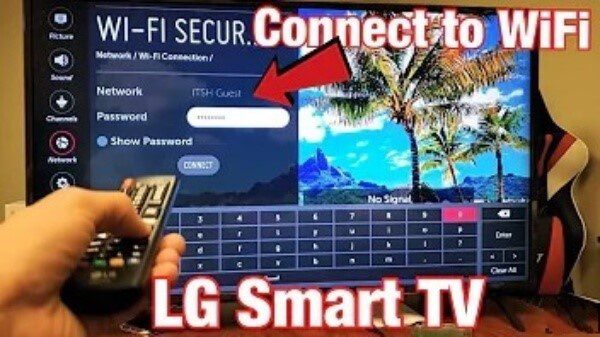
How to turn WiFi on LG TV
Follow these steps to turn on wifi:
- Press the home button from your remote, and go to settings at the top right side of the screen.
- The network connection in the network menu interference follows the select network.
- Choose your wireless network and input your IP address and password.
- Your LG tv should be connected to wifi now.
Connecting Your LG TV To Wifi
Here, you are given steps to connect LG tv to wifi:
- Select the gear button of your remote to bring a quick menu.
- Go down until you find the network option.
- Press the center button to select network.
- Now, settings will be opened on the tv. Click the right arrow to go to settings.
- Select the wifi connection option by scrolling down by the center button of your remote.
- Press the center button again to turn on wifi.
- Select your desired wifi network by pressing the center button of the remote.
- If you have password-protected wifi, enter the password and hit ok.
- Now select connect option from the center button of the remote to connect wifi on the TV.
- Check your wifi; if it is working, go to the Home option and go to apps, browsers, and streaming services.
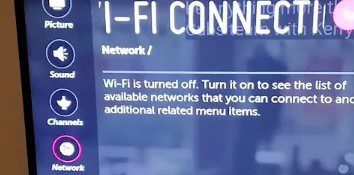
How To Fix LG Smart TV Wifi
It is not too difficult to fix the problem your LG tv is facing. Various methods are available to get rid of the wifi connection issue on LG tv. You can try them one by one to get your problem resolved.
- Try Rebooting LG Smart TV
- Disable Your LG Smart TV Quick Smart Feature
- Unplug Your Modem Or Router
- Update The Date And Time Settings
- Update LG Smart TVs Software & Firmware
Try Rebooting LG Smart TV
If you get annoyed with your wifi not working on your LG tv. Reboot your smart tv. It is the first and the easiest way to repair or fix any problem in LG tv. You can use the smart button at the back of the tv or you can reboot or restart the tv with the remote.
- Press the home button for the menu
- Scroll down to settings
- Clock restart
- Follow the screen instructions until you find the end of the page
- Select Confirm
- Enter new password
- Choose restart
Disable Your LG Smart TV Quick Smart Feature
All LG tv does not have innovative feature. But it has been reported that it was creating an issue in the past, so it’s better to turn it off.
- Go to the settings menu and select all settings
- Select general
- Go to the quick start feature and turn it off
- Power off and unplug your tv
- Then press the power button for 30 seconds
- Plug the switch in again and turn on the tv
- Try to reconnect to the wifi
Unplug Your Modem Or Router
Unplug your router, wait for a minute, and then switch it on again. It will reset your tv and adjust the wi-fi signal, and you may have your problem fixed. Or else you need to contact your internet service provider.
- Keep your router plugged in
- Then, find its reset button
- Hold down the reset button for 30 seconds with the help of any paper clip
- Release the button
- Wait for the router to turn on again
Update The Date And Time Settings
This point looks strange about fixing LG tv wifi, but it has been found to work for wifi settings. You need to change the time and date settings to see if it works for you.
- Go to settings from the home menu
- Then move to general
- Select the date and time
- Uncheck set automatically
- Manually edit your local date and time
- Double-check to disable the automatic time and date settings
Update LG Smart TVs Software & Firmware
Software updates are a fundamental part of smart devices. They add new features, make the software more advanced, and fix any bugs if present. If you have an LG tv, you can set it automatically for its software and firmware update.
If your TV cannot check updates for you, you can manually download and install them through USB. If you want your LG tv software updated, you should enable the software updates option. Let’s have a look at the steps to update the software:
- Press the settings button on your LG tv remote control.
- Select all settings.
- Go to the general tab on the setting menu and open about this tv.
- Now, click the check for updates button.
- If the new software update is available, click on the download and install button.
- If you want your LG tv to update software. Manually, search allows automatic updates. Option and click on it.
You can update firmware manually through USB. For this, follow the below-mentioned steps:
- Download the LG tv firmware from the app store. Check the hard drives or model number on the sticker where product details are given on the back side of the TV.
- If the tv is mounted on the wall then go to settings > general > about this tv > tv information to find the model number.
- Now open the LG support page in the web browser, select your region and country, then click on the support tab.
- Enter your model number in the search field and select your product.
- Click on the software file under software and driver.
- When the firmware zip file is downloaded, place it on the desktop.
- Now rename the firmware folder name to LG-DTV.
- Save the LG-DTV containing the firmware file to a USB pen drive.
- Insert pen drive to LG tv.
- As the pen drive is connected, it will take a bit to display. Click on the stay option so that your tv can detect firmware files.
- When you see the USB update ready, click on the install button for software updates.
- Wait until the update is finished, then restart your computer to check the software updates on your LG tv.
Alternatives to connecting WiFi to your LG TV
Wired connection/Ethernet
You can also try an Ethernet cable directly connecting to your router. Many people have tried this to establish a wi-fi connection on my LG tv. It will help you to figure out the exact problem.
If wifi works fine with Ethernet, it means there is a fault in the router or internet server. If the problem persists, then your tv has some issues.
Streaming device
You will have to spend some extra money on it. But it will fix your problem. Buying new devices for streaming like amazon or Roku is much cheaper than buying new parts for your LG tv. Streaming devices are renowned for being much smarter than smart tv.
Gaming console
If you have an LG smart tv, you can download the stadia app on your tv to play games with the stadia controller. For this, you need a stadia account, an internet connection, an LG webOS smart tv, and a stadia controller.
To launch the game, go to the stadia home screen, select the game you want to play, then select play.
As you are assigned to the stadia app, access the stadia menu. Press the stadia button on your stadia controller to touch the gamepad on your mobile device. You can also press the home button or select avatar at the right corner of the screen.
Conclusion
To conclude all this, you must first power cycle your LG tv if facing any issues with the wifi connection.
Unplug it from the power source, wait for 15 to 20 seconds, and plug it in again to see if the issue is fixed. If it is not fixed, try other methods explained in the article. Hopefully, your problem will be resolved.
FAQs
Why is my WiFi turned off on my LG Smart TV?
If your LG tv wifi is turned off, the first thing you should go for is to check whether the wifi setting is on or not. Or the wifi device has a strong signal enough.
It might be possible that someone has turned the device off, and it is not to your knowledge. Sometimes it may be a software issue; you may not have the software up to date.
How do I turn on the WiFi on my LG Tv?
- Press the home button from your remote, and go to settings at the top right side of the screen.
- Select network followed by network connection.
- Choose your wireless network and input your password.
- Your LG tv should be connected to wifi now.
How do I turn on the WiFi on my smart TV?
- Press the menu button, then press the settings
- Go to general and select network
- Go to open network settings
- The menu path on your network settings may vary
- Select wireless from network types
- Select wifi network
- Enter the password and select done
- Your tv will examine the issues of network and display
- Select close to finish it
Why won’t my LG connect to WiFi?
If your LG tv is not connected to Wi-Fi, there can be multiple reasons for this. It can be due to your internet provider, or it can be a physical hardware problem.