

Starting a video account can feel difficult when every post seems to require a new script, performance, and location. A reference-based workflow gives you a more concrete starting point: a recognizable video format, a new subject, and a reason those elements belong together. With genjutsu ai, you can explore that combination by replacing the performer in reference footage with your own character, image, or animal subject. The goal is to build a recognizable account around fresh interpretations of familiar video ideas.
Choose an Account Premise Before Choosing a Trend
A new account needs an idea viewers can describe. A sleepy cat reacts to everyday frustrations. An original animated character takes ordinary situations far too seriously. A fictional mascot performs dramatic entrances at completely inappropriate moments.
These premises make trend selection easier. You can judge whether a format gives your recurring subject something interesting to do, instead of collecting unrelated clips because they attracted attention elsewhere.
Choose a subject you can represent consistently across reference images. Its appearance should remain recognizable as the action changes. A clear silhouette, expressive face, or distinctive outfit can give the account a visual connection between posts.
How to Build the First Set of Trend Adaptations
Step 1: Find a Format with a Readable Main Action
Look for a dance, reaction, entrance, or reveal you can describe in one sentence. The appeal should be understandable without knowing the original account’s entire history.
Watch where the performer is visible and how the action develops. Frequent cuts and overlapping subjects may complicate a first experiment. Choose a clear performance that suits the recurring character you want to establish.
Use reference material you have permission to adapt. Being able to view a clip online does not automatically give you permission to reuse it for your account.
Step 2: Choose a Replacement That Changes the Joke
Ask what becomes unexpected when your subject performs the action. A solemn animated knight doing a casual victory dance has a different comic effect from a human performer doing the same routine.
The substitution should be readable during the important moment. A tiny character hidden in a wide shot may not communicate the contrast. Choose the subject and framing together so viewers can see what makes the adaptation different.
Step 3: Upload Consistent Images and Generate
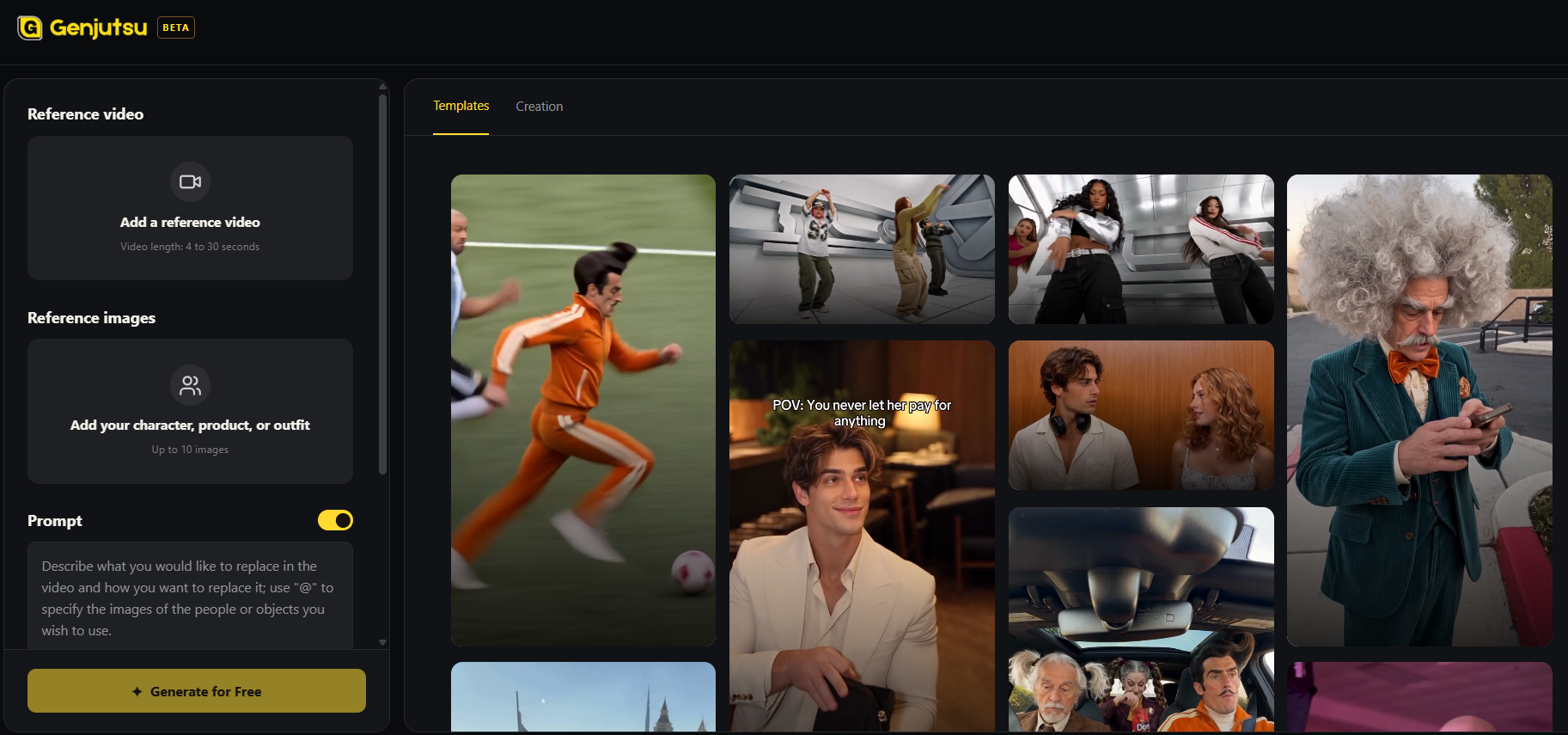
For custom footage, upload the reference video and replacement images, then describe the intended change. Identify the performer and the action you want the new subject to follow.
A possible instruction is: replace the main performer with the uploaded sleepy cat character, following the original entrance and surprised reaction. Keep the striped coat and rounded face recognizable.
Alternatively, choose a ready-to-use template. Its built-in instructions let you upload replacement images without writing your own prompt. Select a format that already supports the intended joke.
Step 4: Review the Hook and the Performance
Watch the entire result at normal speed. Can a new viewer identify the unusual subject immediately? Is the reaction or movement still understandable? Does the replacement create a reason to keep watching?
Then inspect continuity, proportions, and interactions with surrounding objects. Animal and animated subjects can differ substantially from the original performer, so do not assume every movement will translate equally well.
Step 5: Publish Around a Repeatable Idea
For a TikTok or Instagram Reels account, think about how each post introduces the subject to someone who has never seen it. A short setup can explain the situation while leaving the action visible.
Plan different situations within the same premise. Reuse the recognizable character, but give it a new problem or reaction. This creates a clearer account identity than switching between unrelated subjects and formats without a connection.
Example Case: A Sleepy Cat Faces Everyday Drama
Imagine a fictional creator launching an account about a cat that treats minor inconveniences as major events. This is a proposed creative scenario, not a reported growth result.
The creator chooses an entrance format for the account introduction, a startled reaction for an early alarm, and a celebration for finding an empty seat. Each adaptation uses the same cat references, so different actions belong to one recognizable personality.
For the alarm post, a caption such as “When your human books an early appointment” supplies the situation. The creator would review whether the cat remains recognizable and whether the original reaction still reads clearly after the substitution.
If the reaction looks confusing, they could choose a simpler reference. If the video is coherent but the situation is unclear, the caption or underlying joke needs attention. These are different problems and should lead to different revisions.
Use Early Posts to Learn What the Account Is About
Before uploading, show a draft to someone who has not read the brief. Ask them to describe the subject, the situation, and the surprising moment. If they recognize the cat but miss the joke, revise the setup. If they understand the setup but cannot see the reaction clearly, review the footage or framing instead.
Keep the next ideas close enough to compare. Moving from an alarm reaction to a similar everyday frustration can teach you more about the account’s premise than immediately switching to an unrelated character and genre. A focused early set helps you discover what the recurring subject does well.
Record which setups viewers understand, which subjects remain readable, and what kinds of follow-up situations people suggest. Use that feedback to refine the premise. Do not treat a familiar format as a guarantee of reach or follower growth.
A reference-based workflow can shorten the path from an idea to a draft, while the account’s identity still comes from your subject and creative choices. To explore a consistent series of unexpected trend adaptations, genjutsu ai gives you a starting point built around reference footage and your own visual assets.