
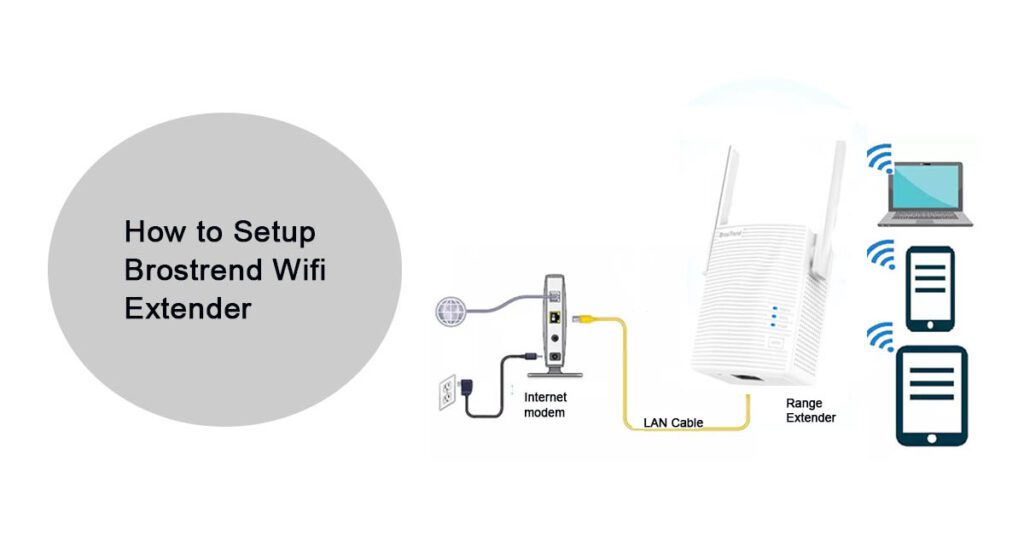
The extender means what exceeds something while repeating it. Although it is present between the base router and the access point; but there could be a lot of reasons for the Brostrend WiFi extender setup taking time.
Whether it can be the cause of the LED light not blinking blue and green or might be access point could be a reason, but no worries as we are here to help you out using different ways:
Here are some methods to Setup WiFi extender:
LEDs on the Extender for Setup
- Power LED Light- After you just power on the extender and the LED light starts blinking it means the extender is in process to start up. As a result when the light is solid visible, it indicates that the extender is now on. But if the LED is not even blinking or visible it means the extender is off.
- WPS LED- If the LED on the WPS is off, the WPS function is not enable on the device. However if the LED turns on solid for sure the WPS connection is formed.
- Signal LED- But if the Signal LED is solid red it clearly defines the router is far away and not in connection so make sure to place them at a close distance. But if it is blue it indicates that the router is in the correct position and connected well with the WiFi router.
Besides, if the lights are totally invisible or only red light is visible, it is an indication that the wireless router is having no connection.
Router’s WiFi Signals Are Poor
Let’s just discuss the setup procedure briefly, and check whether the location of the WiFi extender is what we are looking for.
Before proceeding to the setup procedure, let’s briefly discuss the optimal location of the Brostrend Wi-fi extender setup.
Always, keep that it should be in the range between the existing WiFi routers. For optimal WiFi performance, the basic rule is you must connect the extender to the power outlet. But it must be placed between the existing routers.
Plug The Dual-Band Wi-Fi Range Extender:
Brostrend Wall Plug Dual-Band WiFi Range Extender is the fastest way to extend the WiFi coverage.
Follow these steps, to extend the coverage of Brostrend Wall Extender:
- While setting up make sure to plug the extender in the electric band.
- For a seamless setup experience you have to do the setup of the router and extender in the same room.
- Make sure the LED turns solid blue instead of white or something else.
- You can set up the Brostrend extender in two ways: one is by using the interface of the re.brostrend.com, or you can do it just by pressing the WPS button on the router.
Besides, make sure the router is prepared to connect with a WPS button.
Login Brostrend Extender with Re.Brostrend.com.
Brostrend Extender setup allows you to boost your internet speeds, and it can improve the WiFi range of the extender by wireless coverage. Henceforth it can increase the reliability of your connection, and extend your WiFi range.
Configure The Settings While using Web Interface;
However, you need to configure the settings to achieve a better Wi-Fi range. To reach the Brostrend WiFi extender login page. You need to perform Brostrend WiFi Extender login steps before the setup.
Note: Make sure you follow the given steps in the exact order given below. Otherwise you will definitely face extender setup issues.
Guide To Setup
- You need to connect your PC or mobile phone to the Brostrend extender network in order to log into the Brostrend account.
- To use the extender, you need to plug it into the power supply and turn it on.
- Your appliance should now have WiFi enabled & the network setup should be open.
- Make sure the SSID of the extender is correct. Note: If you face any hassle with the steps, visit the help section for assistance.
- If you want to connect your appliance to the extender network, you will need to use the default SSID brosTrend_EXT.
- You have to redirect the login window from the http://re.brostrend.com login wizard to the web interface in order to login.
- Sign in to the range extender login page for Brostrend.
- You can access the login wizard from 192.168.0.254 if the login wizard is not opening from this address.
- Write your Brotrend extender administration password and username in the login window of the extender.
- By clicking on the login button below.
- There you go.
You have successfully logged in to the Brostrend extender default login admin panel. And it is free to extend the network you wish now or in the future.
Setting Up WiFi Access Point Mode:
- In Access Point, the Brostrend extender setup is essential. Once you connect to the router.
- We can use any password with the device, the SSID will retransmit the router.
- The devices like wireless signals and the distance will definitely depend on the extender range.
- To get a long-range signal to run an extender an Ethernet cable should connect to a broadcast WiFi signal.
- This could be a good option to choose when the router signal is not enough in boosting.
- In case, an Ethernet cable can run the router far from home while attached to the Brostrend Extender setup that should act as an access point.
Switching From Ethernet To WiFi
- However, you can also use a WiFi Ethernet adapter for Brostrend WiFi extender setup.
- An Ethernet cable which is having the quality of an Ethernet cable but not qualified.
- A device can also be repaired which has an internal WiFi card.
- It’s really simple to use; all you have to do is connect the Ethernet connection from the unit to the wireless device.
- To transfer the data plug an Ethernet port to the router connection and now, finally set up.
- In the meantime try to connect your PC now to the Brostrend extender using an Ethernet cable.
- As a result, this is a fantastic choice for laptops, desktops, Android TV boxes, Smart TVs, or any other device that requires WiFi and has an Ethernet connector.