
Lost treasured photos on your SD card due to accidental deletion? Wondering can you recover deleted photos from SD card? Don’t worry. You will get the right solution here. In this article, we’ll provide five fixes on how to restore deleted pictures from SD card.
Whether you want to learn how to recover deleted photos from a camera SD card or an SD card in an Android phone, we’ve got you covered. Now, say goodbye to the despair of lost photos and embark on a journey to revive your photographic treasures.
Part 1:Can You Recover Deleted Photos from SD Card?
In fact, you don’t need to worry about how to restore deleted pictures from SD card, especially if you haven’t used the card extensively after the deletion. However, when certain circumstances arise, it becomes incredibly challenging to recover deleted photos from your SD card.
When you card gets corrupted physically
Corruption can be of two types: physical corruption and software corruption.
Physical corruption means the hardware components of the SD card have suffered some form of physical damage or failure. If the hardware is damage, we highly recommend seeking the assistance of a professional data recovery service. Although this process is time-consuming and expensive, it is the most effective method aside from having backup files.
When photos are overwritten with new data
When your photos are deleted from your SD card, they are not physically removed. It’s just that, the space they are using becomes available to be written upon. If another file photo has been written on an already existing photo, then it is nearly impossible to recover your deleted photos from memory card.
Part 2:5 Fixes on How to Recover Deleted Photos from SD Card
Fix 1:Recover Deleted Photos from SD card with 4DDiG
When you ask questions like “how to recover deleted photos from an SD card” or “how to recover deleted photos from a camera SD card” on online forums or social media platforms, the most common response you will receive is undoubtedly to use reputable data recovery software.
4DDiG Data Recovery is a precise tool designed specifically for SD card data recovery. It is capable of recovering deleted, lost, formatted, or corrupted data from SD Card, Memory Card, TF Card, and more. Furthermore, it supports the retrieval of various file types, including photos, videos, documents, and audio files.
Here is how to restore deleted pictures from SD card in 3 simple steps:
- To begin, open the 4DDiG and connect your SD card. The tool will then display a list of all the external and internal storage devices connected to your PC. Then, choose the SD card you wish to scan.

- 4DDiG will immediately scans your micro SD card and loads the deleted photos. It may take a while, but you can pause or stop the process at any time.

- Once the scan results are available, you can review the found photos, preview them, and save the ones you desire on your device by clicking on the ‘Recover’ button.

Fix 2:Recover SD Card Photos via Recycle Bin
Android Phone
A mobile phone normally stores your files for 30 days before permanently deleting them, if you delete your photos. Hence, you can easily recover deleted photos from SD card through some Android file management apps or gallery apps like google photos.
Desktop
When you delete photos directly from an SD card, they bypass the Recycle Bin or Trash and are permanently removed. However, if you have deleted the photos from your computer’s internal storage or an external drive and they were originally stored there before being transferred to the SD card, you can recover SD card photos from the Recycle Bin(Windows) or Trash(Mac).
PROS:
- Free
- 100% effective within 30 days
- Easy recovery
CONS:
- Not guaranteed after 30 days
- You have not cleared deleted photos within 30 days
Fix 3:Recover Deleted Pictures from SD Card using a Cloud Backup
If you have the habit of backing up your data, it can be a effortless task to recover deleted pictures from SD card. Common cloud backup providers include Dropbox, Google Drive, Microsoft OneDrive, and so on. Here is how to restore deleted pictures from SD card using a cloud back up:
- Log in to your OneDrive account.

- On the left side of the screen, click on “Recycle bin” or “Photos”.

- locate the specific deleted photos you want to recover. Then, at the top of the page, click on the “Restore” button.

Recovering SD card photos from Dropbox or Google Drive follows a very similar process.
PROS:
- 100% effective if you have previously backed up your data
- Some cloud storage service providers provide free services
- No technical knowledge required
CONS:
- Searching for the photos you want to recover can be time-consuming
- Only works when you have a backup
Fix 4:Recover SD Card Photos through a Backup
In order to avoid data loss, both Windows and Mac systems have backup tools.
For Windows systems, it provides a backup feature called “File History.” Here are the steps to recover deleted photos from SD card from File History backup:
- Press “Win+S” and type “File History” into the search bar. Then, click on it.

- Click on the “Restore personal files” option.

- In this window, you can browse through previously backed up files and select the files you want to restore. Right-click on the desired files and choose “Restore to original location” or “Restore to a specified location.”

For Mac systems, it also provides a backup tool called “Time Machine.” Here are the steps to recover SD card photos from a Time Machine backup:
- Click the “Time Machine” icon in your menu bar. Then, Click on the Enter Time Machine” option from the menu. Make sure the external hard drive containing your Time Machine backups is connected to your Mac.

- Use the timeline on the right-hand side or the up and down arrows to navigate through the backups and find the specific time and date when the files you want to recover were still present.
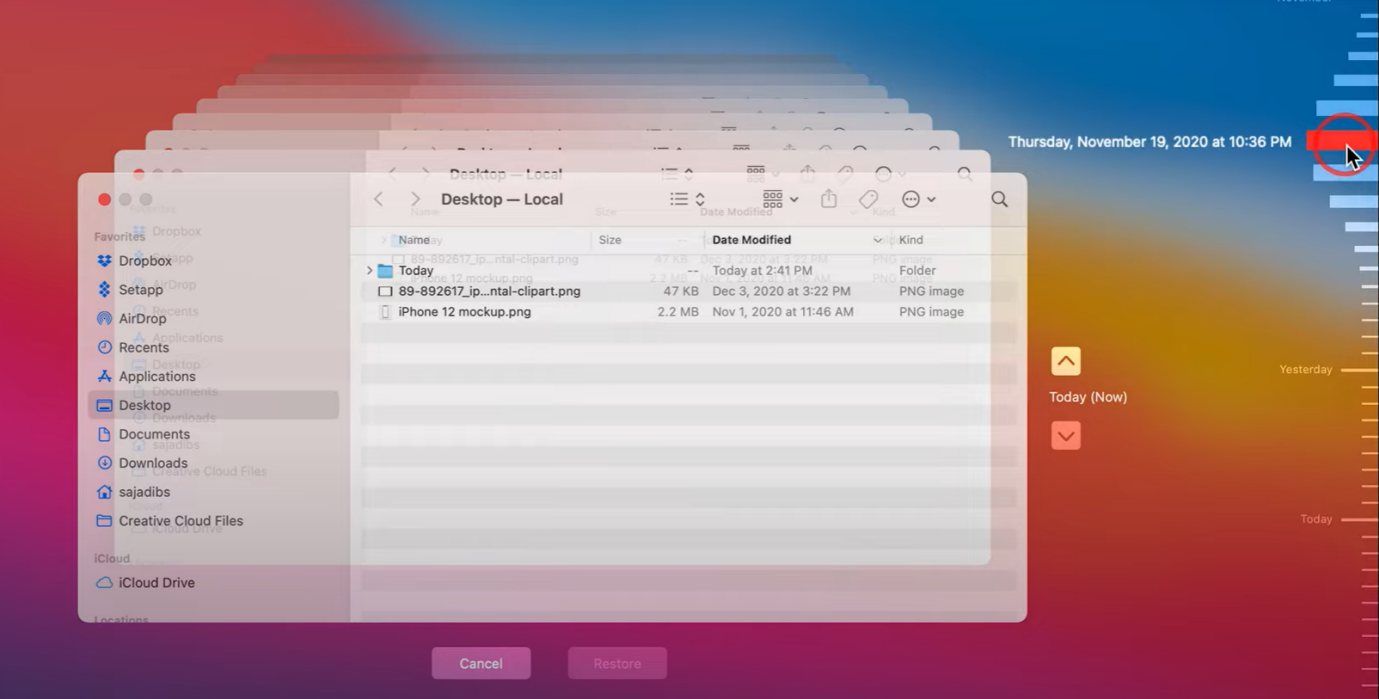
- Once you find the files you want to recover, select them and click on the “Restore” button. If you’re recovering files to a different location, you can drag and drop them to the desired folder instead of clicking the “Restore” button.

PROS:
- 100% effective if you have previously backed up your data
- No cost
- No technical knowledge required
CONS:
- Searching for the photos you want to recover can be time-consuming
- Only works when you have a backup
Fix 5:Professional Data Recovery Services
If you have tried all the methods mentioned above and still cannot recover deleted photos from the SD card, seeking professional data recovery services would be the final option. Here are some important factors to consider when choosing Data Recovery Services:
- Proper data privacy protocols and non-disclosure agreements to safeguard your data.
- Look for a service provider with a proven track record in data recovery.
- Research the service provider’s success rate in recovering lost data.
- Consider the estimated turnaround time for data recovery.
- Transparent pricing and clear communication regarding cost
PROS:
- 100% Reliable
- Last option when all other recovery methods fail
CONS:
- Time-consuming
- Expensive
Part 3:Useful Tip to Avoid Data Loss in the Future
Nothing beats taking regular backups. Everyone can get easy access to cloud drives these days. In your iPhone, you can save your camera roll files to iCloud in real-time. On your Android phone, you can sync your photos with Google Drive or Dropbox.
If you still want to know how to recover deleted photos from a camera SD card, I strongly recommend that you first back up your precious photos from the camera to a hard drive or cloud storage!
Even if somehow, you end up deleting your favorite photos, now you know how you can recover deleted photos from your SD card.
Final Words
In conclusion, it can be a straightforward process to recover deleted photos from an SD card. Remember to act promptly to increase your chances of successful recovery.
FAQs about How to Recover Deleted Photos from SD Card
Q:How do I recover deleted pictures from my SanDisk SD card?
A:We highly recommend using professional data recovery software like 4DDiG:
1.Connect your SD card to the computer.
2.Launch 4DDiG and Select your SD card for scanning.
3.Locate the deleted files and recover the to a safe location.
Q:Is there a deleted folder on SD card?
A:No, typically, there is no specific “Deleted” folder on an SD card. When you delete files from an SD card, they are usually marked as deleted in the file system and the space they occupy is marked as available for reuse.
Q:Why are my deleted photos from my SD card still full?
A:If you have deleted photos from an SD card but the capacity still shows as full, there could be several reasons:
- When you delete files, the operating system may only mark them as deleted without immediately removing the actual data from the storage device.
- Files on the SD card may be set as hidden, making them invisible in file managers, but they still occupy storage space.
- Some applications or the system itself may create cache files or junk files on the SD card.
- It could be due to a problem with the SD card itself, such as card corruption or bad sectors.