
I accidentally erased a bunch of text messages on my Android phone. Is there a way to get them back? I need them.
Accidentally deleting text messages on your Android device can be a distressing experience, especially when those messages contain important information or hold sentimental value. If a software failure caused the deletion or some other event that could not have been predicted, the loss of essential SMS messages may be inconvenient. Luckily, text messages can be restored using different techniques on Android phones and tablets, with a backup in place or without. This step-by-step guide shall help you recover your lost messages. Let’s see how to find deleted messages on Android.
Part 1: Potential Reasons to Retrieve Deleted Text Messages
- Accidental Deletion: It is easy to delete important messages while sorting company messages accidentally.
- Legal Evidence: Text messages are beneficial in legal issues such as cases or inquiries.
- Sentimental Reasons: Any message we receive from friends or family is unique.
- Business Communication: Information transferred through SMS may be strictly related to work and hence necessary for professional reasons.
- Proof of Agreements: Text-based agreements or contracts might be required to be accessed at some point during the operation.
- Forgotten Information: A phone number, sender’s address, date, or password shared via an SMS may be required later.
- Parental Concerns: Sometimes, parents may wish to monitor their children’s conversations, mainly for safety purposes.
- Security Breach: Some messages may be hacked or accessed by unauthorized persons and hence may be essential to be retrieved.
Part 2: How to Retrieve Text Messages On Android Without Backup (Proven Technique)
If you have not created a backup, there is still a chance to restore deleted messages with the help of specialized data recovery. Data privacy and security risk cannot be compromised; therefore, you need to use trusted software.
Using Data Recovery App
Several reputable Android data recovery tools can help you retrieve deleted text messages without a backup. We recommend using UltData by Tenorshare. After selecting a suitable software, the process is generally straightforward:
With UltData Recovery App for Android, you can recover deleted messages on your Android device quickly.It can recover from an accidental file deletion or system updates. With its intuitive interface you are able to preview and selectively restore messages without rooting your device. Ultdata can recover fresh or permanently lost texts on most android models (e.g Samsung Galaxy) safely. If you’ve lost some of your important files and want them secured and restored fast then it’s a good solution. It’s good, reliable, and user-friendly.
Step-by-Step: How to Get Text Messages Back That You Deleted in Android iOS
Step 1: Download and install UltData for Android
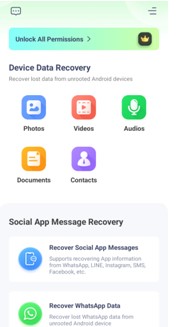
First of all download the UltData app from Google Play onto your Android phone and install it. After installing, launch the app and browse your recently deleted messages. Choose “recover social app messages” option.
Step 2: Enable Recovery Mode for Messages
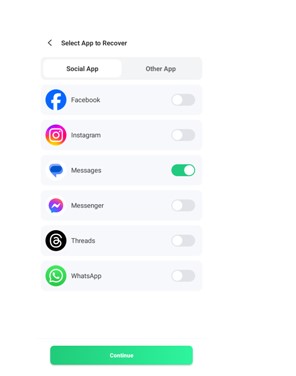
After you launch the app, go into the ‘Message Recovery’ option among other recovery modes. Once you tap, UltData will instantly begin analyzing your phone memory to see the messages lost behind the system on the phone.
Step 3: Recover the Messages & Preview
After the scan, UltData will show you a list of all the recoverable messages. Previewing allows you to see that the content includes what you need. Click the messages you want to recover and the “Recover” button.
After you have saved the selected ones, they will be quickly saved back to your device, where they will be available as usual in your messaging app.
Benefits of UltData for Android
- No Rooting Required: Recover data without voiding your device’s warranty or installing offending software. UltData makes sure you will recover your information completely risk-free.
- Multi-Scenario Recovery: Get back lost messages, photos, WhatsApp chat, and all crucial files in any type of data loss situation.
- User-Friendly Interface: Both beginners and experienced users will find intuitive design, easy to navigate and recover data effortlessly.
- Compatible with Major Android Devices: Works with most popular brands like Samsung Galaxy, OnePlus, Xiaomi and many others.
- Recovers Permanently Deleted Messages: Recover data that’s been erased, as well as data that never backs up, so there’s nothing truly lost.
Part 3: Recovering Deleted Text Messages with Backup (5 Easy Ways)
If you’ve previously set up backups, you have multiple options to restore your deleted messages:
1. Google Drive Backup
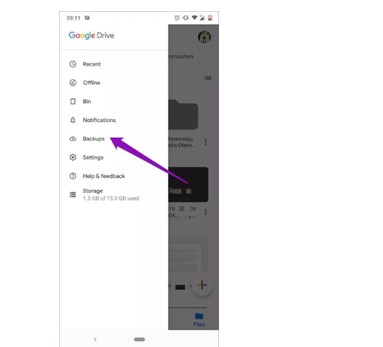
The Google Messages app usually used on Android devices doesn’t offer an easy way to manage the recycle bin. After you delete a message, it’s removed for good until you back it up to the cloud.
- Open the Settings app and tap Google.
- Tap Back up now and then tap the Backup option.
- That means you will have your SMS Text Messages backed up to your Google Drive account.
2. Manufacturer-Specific Cloud Services
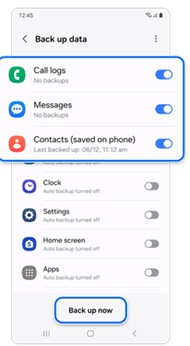
Some companies even provide their own cloud services such as Samsung does with better recovery options. One of them is Samsung’s default messaging app that probably comes with all their phones that have a recycle bin feature exclusive to one UI. Once activated, deleted text messages go to a 30 day bin. To restore messages:
- Samsung Cloud: On the Settings > Accounts and backup > Backup and restore page, select Restore data. Choose ‘Messages’ and continue the restoration.
- Other Manufacturers: Instructions on restoring messages from their cloud services can be found in your device manufacturer’s support resources, and should be used instead.
3. Archived Chats
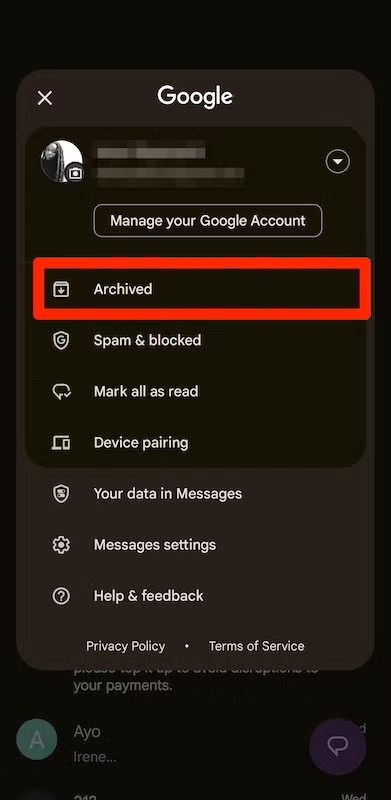
It’s possible you accidentally archived the texts instead of deleting them. Archiving a conversation removes it from the main conversation list but doesn’t delete the messages. To unarchive texts in Google Messages:
- Open the Google Messages app.
- Tap your profile icon beside the search icon.
- Select ‘Archived’.
- Long press the messages you want to retrieve, then tap the unarchive button in the upper-right corner.
4. Messages Stored on SIM Card
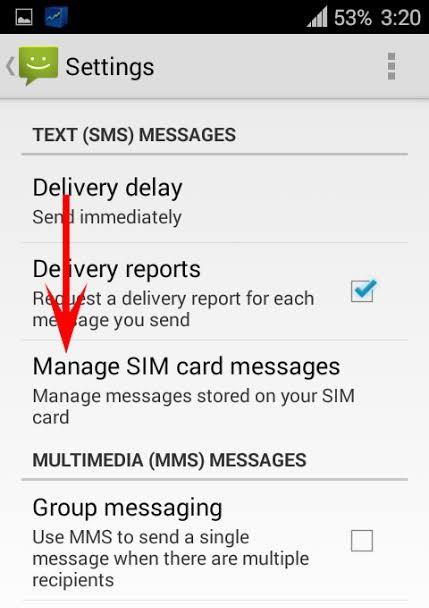
There may be some messages that are stored on your SIM card. To check:
- Place the SIM Card onto a compatible device and open “SIM Messages” option from Settings of Messaging App
- Check if the deleted messages have appeared.
5. Other Messaging Apps
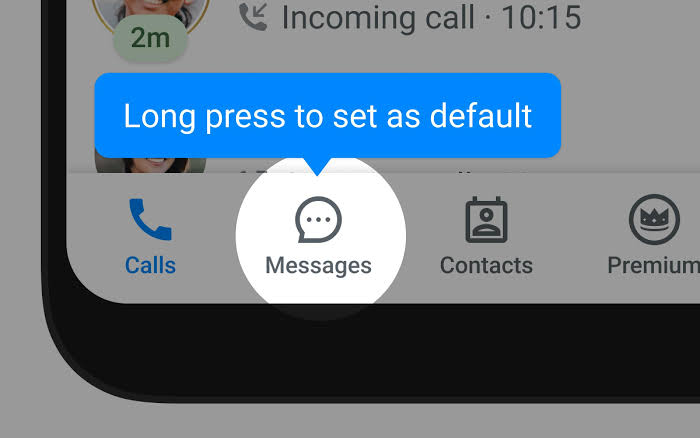
If you have multiple messaging apps, such as Truecaller, check the app to see if your deleted messages can be found on it. It happens when you switch to other apps for messaging.
Part 4: Tips to Prevent Future Message Loss
To safeguard your messages against future loss, consider the following practices:
- Enable Regular Backups
Go to Settings > Google > Backup and make certain that Back up to Google Drive is on to set up automatic backups. You may also use any of the cloud backup services that are offered by the manufacturer of your device.
- Instant Messaging Apps with Recovery Features
All the same, there are apps with in-built functionalities that help with the recovery of lost messages. For example, some applications have the ‘Bin’ or ‘Trash’ folder where the removed messages are being grouped before their final deletion. Of course, using such applications can add an extra layer of protection to your messages.
- Do Not Clear Messages Too Often
If you have ever seen those screens in movies, where the characters fight to wipe out all the messages that filled the screen just because of space or desire to clean up, you should know that such an activity is fraught with possible loss of some vital information. Instead, purposely use archived threads for retrieval while using filters to evaluate and control the display of your message.
For instance, the Google Messages app can archive messages so they do not clutter the primary inbox but are not deleted. It is useful when organizing the inbox whilst still being able to retain potentially valuable messages.
Conclusion
Misplacing the desired text messages on the Android device is always a disappointing experience but mostly, it can be recovered if proper procedure is followed. This means that if you act fast, use reliable methods for recovering lost messages, backup often, and think hard before sending important messages, then you will be able to prevent this sort of loss in the future.
FAQs About Finding Deleted Messages on Android
Is it possible to restore text messages that have been deleted but were not backed up?
It is not impossible to recover deleted text messages without a backup; you just have to use some applications and tools like UltData. However, the effectiveness of lost message recovery depends on parameters such as the time the messages were deleted and whether the new information has been overwritten.
How long are deleted messages recoverable?
The retrieved messages fade with time, and as new data is stored on your device, it may overwrite them. Consequently, the recovery process should be started as early as possible after deletion to increase the chance of the data being recovered.
Are Recovery Tools Safe?
Most preventive and recovery tools are safe, and there is no need to worry about using them. Just make sure that the app you use should keep your data private.