
A product explanation can become outdated surprisingly quickly. A feature moves to a new menu, a plan changes, or a support team realizes that customers keep asking the same question. The written answer may be easy to update; the video is often another matter.
An AI avatar gives teams another way to create short presenter-led content. Instead of arranging a new shoot for every announcement, they can prepare a focused script, generate a speaking clip, and combine it with current product visuals.
The approach is especially useful when the message is narrow: explaining one feature, answering one question, or introducing a change. It still needs the same care as any other product communication. The information must be accurate, the visuals must match the product, and the finished video needs to help viewers understand what to do.
What Is an AI Avatar Product Explainer?
An AI avatar product explainer is a video in which a digital presenter helps introduce a product, service, or feature. The avatar may open the video, explain a customer problem, or guide viewers through the next step.
The presenter is only one element. A complete explainer can also include product footage, screenshots, captions, diagrams, and a closing instruction.
That distinction matters. A viewer who wants to learn where a setting lives in an application needs to see the interface. A digital presenter can provide context, but the actual product screen supplies the demonstration.
When Does an AI Avatar Make Sense?
Some product messages are clearer as a short written note or a screen recording. An avatar is useful when a spoken explanation helps the viewer understand the purpose behind what they are seeing.
Introducing a new feature
A feature announcement usually needs to answer three questions: What changed? Who is it useful for? Where can users find it?
A short presenter segment can establish that context before the video moves into a demonstration. Keeping the video focused on one feature also makes it easier to update later.
Answering a recurring customer question
Questions from support tickets, sales calls, and comments can reveal topics that deserve a clearer explanation.
Imagine users frequently ask where to change an account setting. A short video can introduce the question, show the current interface, and end with a useful next step. The example does not need elaborate production; it needs to match what users will actually see.
Adapting a message for different audiences
The same product feature may matter to different groups for different reasons. A team lead might care about shared visibility, while an individual user might care about finding information quickly.
Separate scripts can address those perspectives without changing the underlying product facts. Each version should still be reviewed for accuracy and tone.
How to Create an AI Avatar Product Video
Define the outcome
Before writing the script, decide what viewers should understand or do after watching. A useful objective might be to recognize a new feature, locate a setting, or understand the first step in a workflow.
If the video tries to explain an entire product at once, important details can get lost. Separate, focused videos are easier to understand and maintain.
Write for the ear
Product pages often contain long sentences, feature lists, and terminology that works better on a page than in speech.
Read the draft aloud. Replace phrases that feel awkward and explain unfamiliar terms before using them repeatedly. A good test is whether someone can understand the sentence without rereading it.
Be specific about the benefit. “This feature improves your workflow” is broad. Explaining what the feature organizes or helps a user find gives the viewer something concrete.
Choose a presenter and generate the voice
A team can begin with a suitable photo or a preset avatar. The presenter’s appearance should fit the audience and the message.
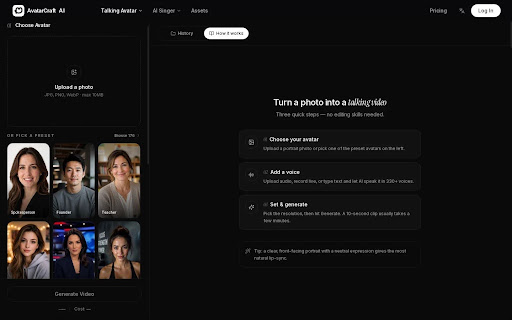
For example, AvatarCraft AI allows users to start with a photo or preset avatar and add a script or audio to create a speaking clip. The result can serve as the opening or narration segment of a product video.
Talking avatar creator.
If using a real person’s image or voice, obtain permission for the intended use. Check the finished audio for names, acronyms, numbers, and pauses before moving on to the edit.
Add the actual product demonstration
Pair the spoken explanation with a screen recording, screenshot, or other visual that shows the feature.
When the presenter says “open the settings menu,” the screen should show where that menu is. Generic background footage can make a video look more varied, but it does not explain the product.
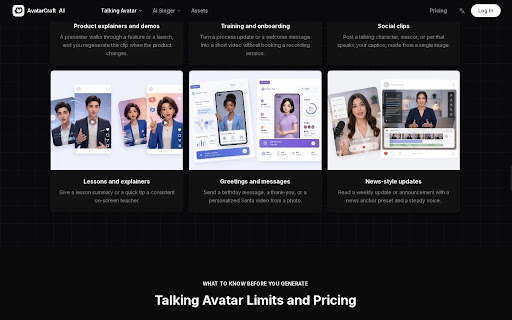
Talking avatar product explainer use cases.
Review the complete edit
A generated avatar clip can be correct on its own while the final video still includes an outdated caption or screenshot. Watch the finished export from beginning to end.
Check the spoken words against the current product. Confirm that captions match the audio and that important interface elements remain visible.
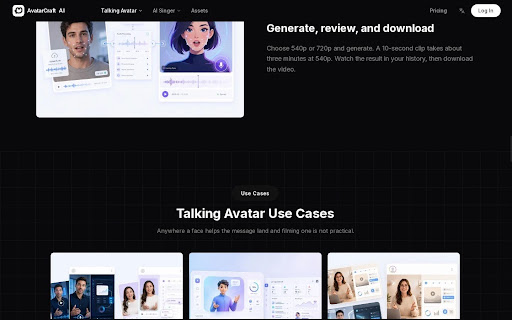
Generate, review, and download a talking avatar video.
A Simple Product Video Script Structure
| Section | Purpose | Question to answer |
| Opening | Establish the topic | What is this video about? |
| Problem | Give the viewer context | What needs to be solved? |
| Explanation | Introduce the feature | What can the product do? |
| Demonstration | Show the relevant action | Where does the user go? |
| Closing | Suggest a next step | What can the viewer do now? |
For a video about an account setting, the script might begin with the user’s goal, explain where the setting is located, and then show the steps on screen. This is a planning example rather than a description of a specific campaign.
AI Avatar Video vs. Other Product Video Formats
| Format | Useful when | Main consideration |
| AI avatar | A brief explanation benefits from a presenter | Check the voice, script, and generated delivery |
| Live-action video | A real person or physical demonstration is central | Filming and revisions require coordination |
| Screen recording | The viewer needs to see a software workflow | Add enough context to explain each step |
| Combined format | The video needs both presentation and proof | Keep narration and visuals aligned |
A product launch could use a filmed spokesperson for the main announcement and a shorter avatar-led video for a follow-up. A tutorial might use an avatar for the opening before switching to screen capture.
The choice depends on what the viewer needs to learn, not on which format is newest.
What Should Teams Check Before Publishing?
A polished video can still confuse customers if it shows an old interface or promises a capability the product does not have.
Before publication, check:
- Product claims: Do they reflect the current product?
- Screenshots and footage: Are the labels and interface up to date?
- Speech: Are names, numbers, and acronyms pronounced correctly?
- Captions: Are they readable and synchronized?
- Permissions: Can the image, voice, and other assets be used for this purpose?
- Plan terms: Does the selected subscription permit the intended commercial use?
AvatarCraft AI’s website states that commercial use is available on paid plans and that its free plan is intended for personal, non-commercial use. Teams should confirm current terms before publication.
Frequently Asked Questions
Can I make a product video from one photo?
A clear photo can be used to create a presenter segment. Product recordings or other visuals may still be needed to demonstrate the feature.
Do I need to record my own voice?
Not necessarily. Some tools offer text-to-speech, while recorded audio can be useful when a particular voice or delivery matters.
Can an AI avatar replace a product demonstration?
An avatar can explain the feature, but it does not replace showing the actual product when viewers need to learn a workflow.
Can I use an AI avatar for marketing?
That depends on the platform’s terms, the selected plan, and the rights associated with the image, voice, and other materials.
Should every product video have a presenter?
No. A simple screen recording may be the clearest option for a quick task. Use a presenter when spoken explanation adds something useful.
The strongest product videos answer a specific question and show enough of the product for viewers to follow along. An AI avatar can deliver the message; accurate scripting and relevant visuals make that message worth watching.