
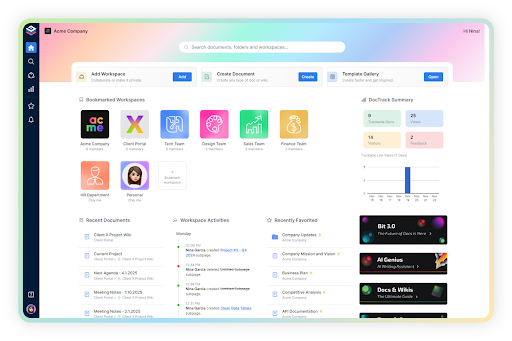
I spend most of my working week writing, planning and coordinating projects, so I know how easily time gets lost switching between tools and keeping different parts of a project organized. For years I treated that lost time as the price of getting things done. Lately, though, I’ve wanted something more practical. I wanted one place for my daily tasks, project documents, and team collaboration, without complicating my workflow.
So, if you’re in the same boat and want a simpler way to keep your work together, come along!
The Mess I Was Working In
My old work setup looked very productive from the outside. Drafts lived in Google Docs, meeting notes sat in a notes app, process guides were buried in a shared drive, and the important links were scattered across chat threads. So many assets and all scattered at different places.
Now, imagine trying to bring all that information together before a team meeting.
I’ve experienced how frustrating this process is. I would spend ten minutes hunting for the latest document, then another five asking a teammate whether it was really the latest. Add that up over a week and it gets embarrassing.
I’d also started using AI chatbots for writing. I was pasting queries into a separate chatbot, copying the output back, and reformatting everything by hand. It saved effort on the writing but added effort everywhere else. What I wanted was simple: documents, team knowledge and AI help in one place, without the copy-paste shuffle.
That’s what made me interested in AI-powered workspaces.
Enter Bit.ai: One Workspace for Docs, Wikis and AI
While exploring different collaboration and productivity platforms, I came across Bit.ai, a platform for creating, organizing and sharing smart documents and wikis, with AI built into the documents. Instead of treating documents, knowledge bases and collaboration as separate jobs, it brings them under one workspace.
And the best part is, it’s very easy to start up with bit.ai. I made a workspace, picked a template (I was too impatient to build from scratch) and started typing. The editor works in blocks, so adding a video, an image or a file from cloud storage feels more like arranging a page than formatting a document.
Embedded content stays linked to their source. Update the original and the doc reflects it. For someone who used to re-upload attachments every other day, that was a relief.
The Features of Bit.ai I Actually Use
After a few weeks of daily use, these are the features that actually changed how I work:
The AI writer: Just press @ in the doc, describe what you need, and it gives a rough draft right inside the doc. Obviously, I always rewrite chunks, but starting with something beats staring at a blank page. There are also options to summarize a long document, reword a messy paragraph or translate text without leaving the page. That’s what finally ended my copy-paste routine.
Ready-to-use templates: I don’t have to start every document from scratch. Bit.ai has a library of templates for proposals, project plans, reports, meeting notes, and other business documents. I can pick a template, customize it to fit my requirements, and get straight to work.
Real-time collaboration: My team edits the same document together, comments inline, and we stop emailing versions back and forth. The “which one is the latest?” question has simply disappeared from my week.
Wikis and knowledge bases: I finally moved our scattered how-to notes into one team wiki. It’s a small change, but people can now search it on their own instead of pinging me.
Sharing controls: You can share a live link, add a password, set an expiry date or invite guests. You can also track when someone opens a document, which makes follow-ups easier. No more “just checking if you saw my email.”
Client portals and workspaces: Separate workspaces keep each project or client organized, with their own permissions, so nothing leaks where it shouldn’t.
How I Use It on a New Project
A new client came in recently, so here’s roughly how I worked with that client in Bit.ai.
I created a workspace for them and started a proposal from a template. I asked the AI to outline a first draft from the client’s brief, then rewrote the parts that needed my own numbers and judgment. That job used to eat a good chunk of my morning. But this time the draft was ready much sooner.
Then, I dropped our portfolio files and a short intro video straight into the doc, so the client didn’t have to open five attachments. Then I sent it as a trackable link. When the client opens it, I can see the engagement, so I know when to follow up instead of guessing.
Finally, once the deal is signed, I used the same workspace for the onboarding notes: scope, timeline, who does what. I didn’t have to rebuild anything in another tool. That’s the part I like most: the proposal, the knowledge and the collaboration all live in one place. The work just carries on in the same place.
What Stood Out to Me While Using Bit.ai
Here are a few things that stood out in my experience:
- Documents, wikis and AI writing live in one workspace, so there is far less tool-hopping.
- Embedded content stays connected to its source, which keeps documents fresh.
- Sharing controls and tracking give me confidence when sending work to clients.
- Templates and real-time collaboration make teamwork faster and more consistent.
- There is a free plan, so you can test the workflow before paying anything.
Who Would Get the Most Out of It
Having used it for a while, here is who I think gets the most out of an AI-powered workspace like Bit.ai:
- Freelancers and consultants: send proposals and client updates that look polished, and see when they’ve actually been opened.
- Remote and hybrid teams: keep everyone working from the same document, whatever time zone they’re in.
- Startup founders and small business owners: get docs, a wiki and AI writing help without paying for five different tools.
- Project managers: keep briefs, plans and meeting notes in one place instead of chasing them across apps.
- Marketers and content teams: draft, review and finalize content together without the endless version mix-ups.
- Sales teams: share decks and one-pagers with prospects and follow up when they open them.
- HR and operations teams: maintain SOPs, policies and onboarding guides that people can search for themselves.
- Teachers and students: organize course material, notes and group projects in a shared space.
The list doesn’t stop there. Bloggers, writers and journalists can use it to draft and organize articles. Customer support teams can build a help center and internal knowledge base. Product and engineering teams can keep specs and documentation together, and researchers and analysts can gather notes and findings in one shared place. Coaches, trainers and course creators can organize their programs, and nonprofits, event planners and community managers can coordinate volunteers and plans without a pile of scattered files.
Well, if you see yourself in that list, it’s worth giving the free plan a go.
My Honest Take
The best thing I can say about Bit.ai is that I stopped searching for where my documents and assets are placed. Everything I need, from drafts and project notes to files and client material, sits in one workspace, and I know exactly where to find it.
It sounds like a small win, but it changed how my days feel. I used to lose bits of time all day just looking for things. Now that time goes straight back into the work, and my team feels the difference too.
So, would I recommend it? Yes, if your work involves documents that other people read, edit or depend on, I’d say give Bit.ai a real try. It earned its place in my routine, and it might earn one in yours.
Previously in Artificial intelligence: Manual Handoffs Biting AI Productivity Gains. Solution: Automate the Handoffs