
Have you ever captured a stunning video, only to find an unwanted person, object, or background marring its perfection? If you’ve ever wanted to remove those undesirable elements, this blog is perfect for you.
HitPaw Video Object Remover is a groundbreaking tool designed to rectify this common issue faced by both amateur and professional videographers. It’s capable of eliminating any unwanted objects, people, and clutter from your video in a matter of seconds.
This tool is armed with advanced AI-recognition capabilities that track and identify the movement of objects, enabling precise removal. We will guide you on how to leverage this tool to perfection to remove objects from video.
With its intelligent object removal abilities, rest assured, your video editing will never be the same again. Come, let’s take a look at it and learn how to remove objects from video online!
Features of HitPaw Video Object Remover to Remove Video Object
Convenient to Use (5/5 ⭐)
- An intuitive user interface ensures easy navigation and use.
- A simplified three-step process for video object removal: Choose, select, and remove.
- AI-powered technology automatically identifies and tracks object movement.
- The versatile application enables the removal of objects, people, and clutter.
- Offers precise editing control with the magic selection brush.
Best Quality (5/5 ⭐)
- AI technology reconstructs the background after object removal, resulting in smooth, clean video.
- Delivers professional-grade output.
- Empowers users to make finer adjustments for the perfect edit.
- Creates seamless results, as if the unwanted object was never there.
- Capable of handling complex editing tasks without compromising video quality.
Credible (5/5 ⭐)
- No fake agreements or intrusive advertisements ensure a hassle-free user experience.
- A transparent subscription model allows users to cancel anytime.
- Highly reliable with a strong reputation among its user base.
- Focuses on user trust and satisfaction to remove object from video.
- Adherence to strict privacy and security measures.
On-time Support Services (5/5 ⭐)
- Offers 24/7 tech support to ensure uninterrupted editing work and video object removal.
- Quick problem resolution and assistance with feature-related queries.
- Readily available help to maximize productivity and minimize downtime.
- Covers technical glitches, software inquiries, and troubleshooting.
- Enables smooth and efficient user experience with its round-the-clock support to enable users to remove object from video.
Try Before You Buy (5/5 ⭐)
- Provides a trial version for users to test out features and capabilities of video object removal.
- Allows potential users to get a firsthand experience of the tool’s efficiency to remove object from video.
- Makes sure users are confident about their purchase and its value.
- Reduces risks associated with online software purchases.
- Ensures users’ satisfaction with the tool’s capabilities before they commit to purchasing.
Time-Saving (4.5/5 ⭐)
- Optimized workflow speeds up the video object removal.
- AI-powered technology handles complex tasks swiftly.
- Easy-to-use interface reduces the time taken to learn and adapt.
- Efficient processing & quickly remove objects from video.
- Saves time by allowing bulk editing and processing of multiple videos simultaneously.
Steps
Using HitPaw Video Object Remover to remove video object is as straightforward as counting to three. With the following simple steps, you can swiftly transform your footage into a visually appealing masterpiece, free from any distracting elements, and remove video object.
Step 1: Choose

Start by launching the HitPaw Video Object Remover on your desktop. To select the video you need to work on, either click on the “Choose file” button or simply drag and drop the video file into the editing area. With the user-friendly interface of HitPaw Video Object Remover., you won’t encounter any issues finding the necessary commands or buttons.
Step 2: Select and Adjust

Next, choose the “AI Remove Objects” function. Frame the object you wish to remove by creating a box selection around it. After that, you can adjust the selected area to your satisfaction. You can increase or decrease the size of the selected area, or reselect the object if necessary. The ‘Brush Size’ can also be adjusted, giving you full control over the fine-tuning of your selections.
Step 3: Remove and Export
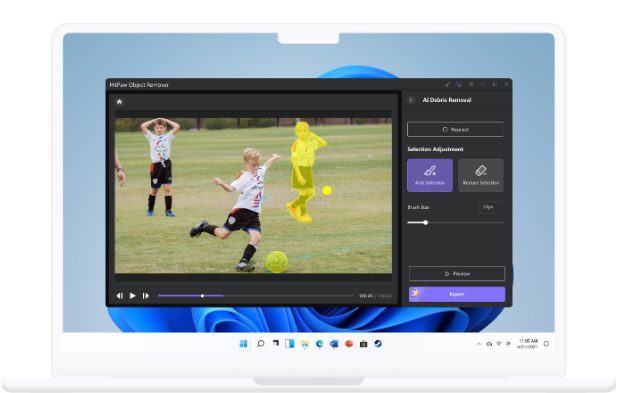
Now you’re ready to remove the unwanted object. Simply click on the “Remove” button and witness the magic of the AI-powered HitPaw Video Object Remover. Before exporting your final video, it’s recommended to preview it using the “preview clip” button. This allows you to ensure that the removal effect is precisely as you envisioned. If you’re pleased with the results, go ahead and export your perfected video. HitPaw Video Object Remover offers various export options to cater to your needs.
In just three simple steps, your video can be transformed from cluttered to clean. HitPaw Video Object Remover allows you to focus on what truly matters in your video content
What Problems Does HitPaw Video Object Remover Solve
From removing ex-partners from cherished memories to cleaning up commercial clips for a professional look, this tool is becoming indispensable in the video editing world. Let’s take a look at some case scenarios where HitPaw Video Object Remover proved to be a saviour.
Case 1: Removing Watermarks
Elizabeth and Blake were educators who often used video materials to supplement their presentations. However, many videos contained watermarks, which proved to be a distraction for their students. HitPaw Video Object Remover’s advanced technology made the watermark removal process as simple as a single click, eliminating unwanted distractions seamlessly, and making the videos look clean and professional.
Case 2: Personal Memories Untarnished
Apinya from Thailand shares her experience using HitPaw Video Object Remover. After breaking up with her boyfriend, the videos they shared together served as a painful reminder of the past. By using the smart AI technology of HitPaw Video Object Remover, she was able to remove her ex-boyfriend from these videos, allowing her to preserve her memories untarnished and pursue a fresh start.
Case 3: Professional Video Content Creation
Salmaan al-Naim from Arab utilized HitPaw Video Object Remover for professional video creation. Often, strangers or unnecessary elements in the video backgrounds hampered the quality and overall aesthetic of his work. Thanks to HitPaw Video Object Remover’s powerful removal feature, Salmaan could easily remove these elements, resulting in perfectly curated video content.
Conclusion
The HitPaw Video Object Remover has emerged as an invaluable tool for both personal and professional video editing tasks. Offering a seamless blend of user-friendly interface, advanced AI capabilities, and robust support services, this tool allows users to quickly and effectively remove unwanted objects from their videos.
As highlighted in various case studies, HitPaw Video Object Remover is changing the way we edit videos, be it watermark removal, untangling personal memories, or professional content creation. By marrying technology and convenience, HitPaw Video Object Remover is truly revolutionizing the video editing experience, ensuring videos reach their full potential with minimal effort and maximum results.