
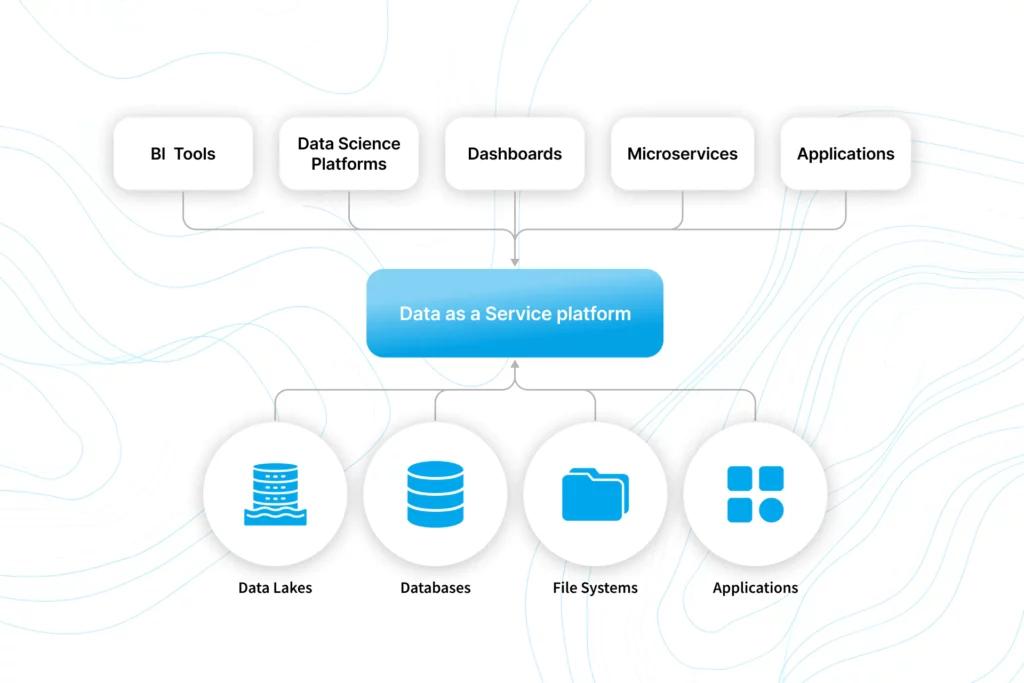
For Data-as-a-Service (DaaS) providers and commercial data providers, delivering and distributing data to consumers effectively is crucial. Whether the goal is providing customers with comprehensive datasets, specific insights, or a self-service platform, having a solid data delivery mechanism (e.g., data portal software) is key to adding value. One effective approach to achieve this is through building a data portal, which serves as a gateway for stakeholders and customers to explore, access, and analyze the data they need.
Why a Data Portal Matters
A data portal offers a centralized platform for data delivery, empowering customers to self-service their data needs without requiring technical intervention from the provider. This approach not only improves customer satisfaction but also reduces operational overhead for data providers. A well-designed data portal should have the following characteristics:
- Scalability: Handle varying data volumes, from small datasets to billions of rows.
- Flexibility: Allow users to perform ad hoc analysis, select specific data slices, or run custom queries.
- Security: Implement robust access controls to ensure data privacy and compliance.
- User-Friendly Interface: Enable data exploration without requiring advanced technical skills.
Building a data portal that meets these requirements can be challenging but achievable with the right tools and approach.
Key Components of Data Portal Software
When building a data portal for data delivery, there are several core components to consider:
- Data Ingestion and Storage
The foundation of any data portal is the underlying data storage. Providers often need to ingest data from various sources, including databases, APIs, or cloud storage. The choice of storage solution should align with the data’s volume and access patterns. For high-volume, read-intensive use cases, columnar databases or data warehouses like Snowflake or BigQuery are ideal. You can also consider alternative data portal software-as-a-service solutions like Gigasheet that provide more turnkey solutions. - Data Governance and Security
Data providers must ensure that the portal enforces strict data governance policies. This includes role-based access controls, auditing capabilities, and compliance with regulations (e.g., GDPR, HIPAA). Encryption at rest and in transit, coupled with user authentication mechanisms like SSO, can further enhance security. - User Interface and Data Exploration
The data portal’s interface should be intuitive, allowing users to explore data, filter results, and visualize trends. A no-code or low-code approach is often preferred to accommodate business users who may not be proficient in SQL or programming. Features like sorting, filtering, pivoting, and aggregation should be readily accessible. - Data Integration and API Access
For customers who need programmatic access, exposing data through APIs is essential. REST or GraphQL APIs enable seamless integration with other tools and systems. This functionality is crucial for embedding the portal’s capabilities within other applications or automating data workflows. - Data Delivery and Export Options
The portal should support multiple export formats (CSV, etc) and direct integrations with popular data platforms for those who need to take data offline or import it into other systems. Real-time data delivery through streaming capabilities can also be valuable for time-sensitive applications.
Building a Data Portal: A Step-by-Step Approach
- Define Your Data Delivery Use Case
- Decide whether you are delivering raw data, processed insights, or a mix of both. This choice will influence the portal’s required features and functionality.
- Choose Your Data Storage Solution
- For handling large-scale datasets, consider cloud data warehouses like Snowflake, BigQuery, or a distributed system like ClickHouse to meet performance and scalability needs.
- Implement Data Governance and Security
- Set up access controls, encryption, and compliance monitoring. These features are critical for protecting data and meeting regulatory requirements.
- Develop the User Interface
- You can custom-build an interface tailored to your specific needs if you require advanced customization. Off the shelf software like Gigasheet offers the benefit of a no-code solution, which offers built-in data exploration tools, allowing you (and your customers) to manipulate/filter/select data without coding. It’s worth also looking at low-code tools like Retool which allow you to build custom solutions without a lot of development.
- Expose APIs and Data Export Options
- Provide programmatic access via REST or GraphQL APIs and support multiple data export formats (e.g., CSV, JSON, Excel) for flexibility in how users consume the data.
- Deploy, Monitor, and Iterate
- Launch the portal, gather feedback from users, monitor for issues, and make continuous improvements to optimize the user experience.
This approach allows for flexibility in building a data portal, whether you opt for a no-code platform to accelerate deployment or build a custom solution for more tailored requirements.
Buy vs. Build: Deciding the Best Approach for Your Data Portal
When it comes to setting up a data portal for delivering data to your consumers or stakeholders, one of the critical decisions is whether to buy a ready-made solution or build your own from scratch. Each approach has its pros and cons, and the right choice depends on your organization’s specific needs, resources, and long-term goals.
Buying a Solution
Pros:
- Speed to Market: Ready-made solutions, like Gigasheet or other no-code platforms, allow for rapid deployment. With built-in data management and visualization capabilities, you can set up your data portal quickly and start delivering value to your customers without lengthy development cycles.
- Lower Initial Costs: While licensing fees are associated with buying software, the overall cost may be lower than building a solution from scratch, especially when considering development time, labor, and maintenance.
- Ongoing Support and Upgrades: With a commercial solution, you benefit from ongoing updates, new features, and customer support. These services help you stay current with evolving industry standards without having to allocate significant internal resources.
- Security and Compliance: Established platforms are often built with security and compliance in mind, making it easier to meet regulatory requirements without extensive custom development.
Cons:
- Limited Customization: While no-code solutions can be tailored to some extent, they may not offer the flexibility needed for very specific use cases or highly specialized features.
- Vendor Lock-In: Relying on a third-party provider means that you are dependent on their roadmap, pricing, and feature availability. If the vendor changes direction or raises prices, you may face challenges in adapting.
Building a Solution
Pros:
- Full Customization: Building your own data portal allows you to design a solution tailored precisely to your requirements. You can implement features that may not be available in commercial platforms and optimize performance for your specific data workloads.
- Control Over Data and Features: You have complete control over the platform’s architecture, which can make it easier to address unique security or compliance requirements and integrate deeply with existing systems.
- No Ongoing Licensing Fees: While the upfront cost may be higher, building your own solution eliminates recurring licensing costs, potentially resulting in long-term savings if the system is heavily used.
Cons:
- Longer Development Time: Building a data portal from scratch can take months or even years, depending on the complexity of the project and your team’s expertise. This can delay the time-to-value for your customers.
- Higher Initial Costs: The costs of development, testing, and deployment can be significant, especially when accounting for specialized technical talent and ongoing maintenance.
- Maintenance Burden: After the initial build, your team will need to handle updates, bug fixes, and support. This ongoing commitment can be a drain on resources, particularly if you have other high-priority projects.
Key Considerations
- Use Case Complexity: If your data delivery needs are fairly standard and align with what existing platforms offer, buying might be the best option. For highly specialized requirements, building a custom solution may be necessary.
- Time-to-Market Pressure: If you need to get a data portal online quickly, a pre-built solution can significantly reduce deployment time.
- Budget Constraints: Evaluate the total cost of ownership, including initial costs, ongoing licensing, and maintenance, to determine which option aligns with your financial resources.
- Long-Term Vision: Consider the future evolution of your data delivery strategy. If you anticipate rapidly changing requirements, buying a flexible solution might be more advantageous. However, if your needs are stable and specific, a custom-built portal could be more cost-effective over time.
In summary, the decision to buy or build depends on factors such as speed, budget, customization requirements, and resource availability. Many organizations find that starting with a turnkey data portal software solution can save time and provide the foundation needed for initial success, with the option to build more custom capabilities later if the need arises.