

When stock runs low, creating a purchase order often requires several manual steps. Someone needs to check the available inventory, review incoming stock, calculate how much to purchase, confirm supplier details, and prepare the order. For businesses managing hundreds or thousands of products, this manual process can take considerable time.
An auto-reorder system can help automate parts of this workflow. Instead of relying on employees to monitor every product, the system can detect when stock reaches a predefined threshold and trigger the next purchasing step.
But detecting low stock and generating a purchase order are not the same thing. Some systems only send alerts, while others can calculate order quantities and create purchase orders using inventory and supplier data.
So, can an ecommerce business automate the entire purchasing process when stock runs low? Yes. With the right inventory data, purchasing rules, and system integrations, businesses can automate much of the workflow while retaining control over order approvals.
1. What Does Auto-Reorder Actually Mean?
Auto-reorder is an inventory feature that triggers a replenishment action when a product's available stock reaches a predefined level.
For example, an online retailer sells a product that has a reorder point of 20 units. When the available stock reaches 20, the system detects that the product needs replenishment and triggers a configured action.
Depending on the system, this action might be:
- Sending a low-stock notification to the purchasing team.
- Creating a suggested reorder for review.
- Generating a draft purchase order.
- Starting an automated purchasing workflow.
The important distinction is that a low-stock alert does not automatically mean a purchase order has been created or sent to a supplier.
A basic auto-reorder feature may only notify the team that stock has reached a certain level. An automated purchasing workflow goes further by checking inventory requirements, calculating order quantities, and preparing the purchase order.
The level of automation depends on how the inventory system is configured and whether it is connected to the necessary supplier and purchasing information.
This distinction matters for ecommerce businesses because the real objective is not simply to know when stock is running low. It is to reduce the manual work involved in deciding what to order and preparing the purchase order.
How Does Automatic Purchase Order Generation Work?
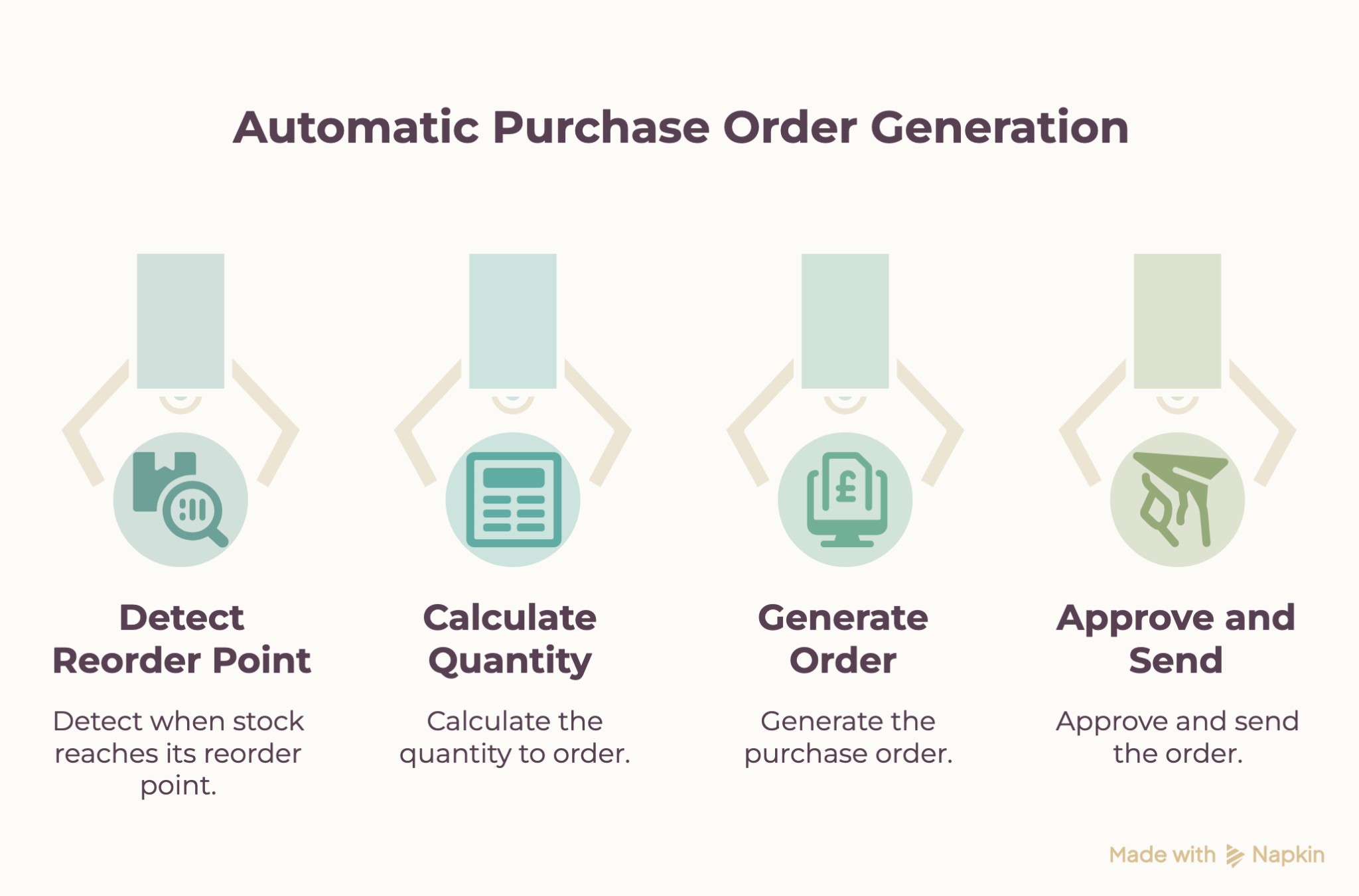
Automatic purchase order generation involves more than checking whether a product has reached its reorder point. The system needs to evaluate current inventory, account for incoming stock, determine how much to order, and prepare the purchase order using supplier information.
Here is how the workflow typically works.
Detect When Stock Reaches Its Reorder Point
The first step is monitoring inventory levels against predefined reorder points.
For example, an online retailer sells 500 units of a product each month. Based on its sales rate and supplier lead time, the business sets a reorder point of 50 units.
When available stock reaches this level, the inventory system identifies the product as requiring replenishment.
However, the system should also consider stock already reserved for customer orders and quantities expected from existing purchase orders. Otherwise, it may trigger unnecessary reorders.
Calculate the Quantity to Order
Once the system identifies a product that needs replenishment, it must determine how many units to purchase.
This calculation should consider more than the current stock level. Relevant information includes:
- Available stock after accounting for reserved quantities.
- Stock expected from open purchase orders.
- Expected demand during the supplier's lead time.
- Safety stock requirements.
- Supplier minimum order quantities and other purchasing restrictions.
For example, the retailer has 50 units available and expects another 30 units from an existing purchase order. If projected demand during the next supplier lead-time period is 100 units, the system needs to account for that incoming stock before calculating the additional quantity required.
The final order quantity will depend on the business's target stock level, expected demand, and supplier requirements.
This helps avoid ordering a fixed quantity every time stock reaches the same threshold.
Generate the Purchase Order
After calculating the required quantity, the system can generate a purchase order using the relevant product and supplier information.
A purchase order typically includes:
- Product name and SKU.
- Quantity to be purchased.
- Supplier details.
- Agreed purchase price.
- Expected delivery date.
- Applicable purchasing terms.
If the inventory system is connected to an ERP or purchasing platform, it can use existing supplier and product records to populate these details.
Instead of manually entering the same information for every order, the system prepares a purchase order using the available data and configured rules.
Approve and Send the Order
Generating a purchase order does not necessarily mean sending it directly to the supplier.
Businesses can configure different approval workflows depending on the order value, product category, or supplier.
For example, a purchase order below a predefined value might be approved automatically, while a larger order could require review from the purchasing manager.
Once approved, the purchase order can be sent to the supplier through the configured communication or purchasing system.
This gives businesses flexibility in deciding how much of the purchasing process they want to automate.
The result is a workflow that can move from low-stock detection to purchase order creation with less manual intervention, while keeping purchasing decisions under the required level of control.
What Information Does a System Need to Create a Purchase Order?
Automatic purchase order generation depends on having accurate inventory, product, and supplier information. If important details are missing or outdated, the system may calculate the wrong order quantity, select incorrect supplier information, or create duplicate purchase orders.
Before automating the workflow, ecommerce businesses should make sure their systems can access the following information.
Current Stock Levels and Reserved Inventory
The system needs an accurate view of how much stock is available for sale and how much has already been allocated to existing customer orders.
For example, a warehouse may physically hold 100 units of a product, but 25 units are already reserved for orders awaiting fulfilment. The system should account for those reservations when calculating how much additional stock is needed.
Without this distinction, the business may believe it has more available inventory than it actually does.
Open Purchase Orders and Expected Deliveries
Stock that has already been ordered but has not yet arrived should also be considered.
If a business has an open purchase order for 50 units, the inventory system should account for those incoming units before creating another order for the same product.
Expected delivery dates are equally important. An order that is due next week may cover an immediate requirement, while a delayed shipment may leave the business with a stock shortage.
Tracking open purchase orders helps prevent duplicate purchasing and improves replenishment decisions.
Historical Sales and Expected Demand
Past sales data helps businesses understand how quickly products are selling. This information can support reorder calculations and help estimate future stock requirements.
For example, a product selling 100 units per month may require a different purchasing approach from one selling 300 units per month.
Businesses can use historical sales patterns alongside seasonal trends, promotions, and other relevant factors to estimate future demand. More advanced systems can also use AI demand forecasting to support these calculations.
However, historical sales alone may not accurately predict future demand, particularly when purchasing patterns change.
Supplier Lead Times and Minimum Order Quantities
The time a supplier takes to deliver products directly affects when a business should reorder.
A supplier that delivers within five days requires a different reorder plan from one that takes four weeks. The system should also account for supplier minimum order quantities (MOQ), order multiples, and other purchasing conditions.
For example, a supplier may accept orders only in batches of 50 units. Even if the calculated requirement is 35 units, the business may need to order 50.
Keeping supplier information updated helps the system generate purchase orders that are practical to fulfil.
Supplier Details, Product SKUs and Purchase Costs
Every purchase order needs accurate product and supplier information.
The system should be able to identify the correct SKU, supplier, purchase price, and other relevant ordering details. This is particularly important for businesses sourcing the same product from multiple suppliers or managing large product catalogues.
Maintaining these records centrally can reduce manual data entry and help avoid errors when generating purchase orders.
Approval Limits and Purchasing Rules
Businesses also need to define how purchasing decisions should be handled.
For example, a company might allow automatic approval for routine orders below a specified value but require a purchasing manager to review larger orders.
Other rules may depend on supplier selection, product category, budget limits or minimum order quantities.
These settings determine which purchase orders can proceed automatically and which require human review.
Why These Data Requirements Matter
Inventory and purchasing information is often spread across multiple systems. Stock levels may be managed by an ecommerce platform, supplier details by an ERP, and product attributes by a separate product information management system.
For automatic purchase order generation to work reliably, these systems need to exchange the relevant information accurately.
Connecting inventory records, supplier data, and purchasing workflows helps businesses reduce manual checks and create purchase orders using consistent information.
Where Basic Auto-Reorder Rules Fall Short
Rule-based auto-reordering works when stock levels and demand are relatively predictable. However, fixed reorder points can create problems when business conditions change.
Common limitations include:
- Seasonal demand: A fixed reorder quantity may not account for increased demand during peak seasons or reduced sales during quieter periods.
- Changing supplier lead times: If a supplier takes longer than expected to deliver, the existing reorder point may not provide enough stock to cover the delay.
- Unexpected demand changes: A sudden increase or drop in sales can make previously configured reorder rules unsuitable.
- Open purchase orders: If the system does not account for incoming stock, it may generate duplicate orders and lead to excess inventory.
- Multiple sales channels: Stock movements across different stores and marketplaces must be considered to avoid inaccurate reorder decisions.
AI demand forecasting can help address some of these limitations by analysing historical sales and demand patterns to estimate future requirements. These forecasts can inform reorder quantities and timing instead of relying only on fixed thresholds.
However, forecast quality depends on the data available and should be reviewed alongside supplier constraints and actual inventory levels.
How to Automate Purchase Orders Without Losing Control
Ecommerce businesses can automate purchase order generation while keeping approval and purchasing decisions under control. A practical setup should include the following steps:
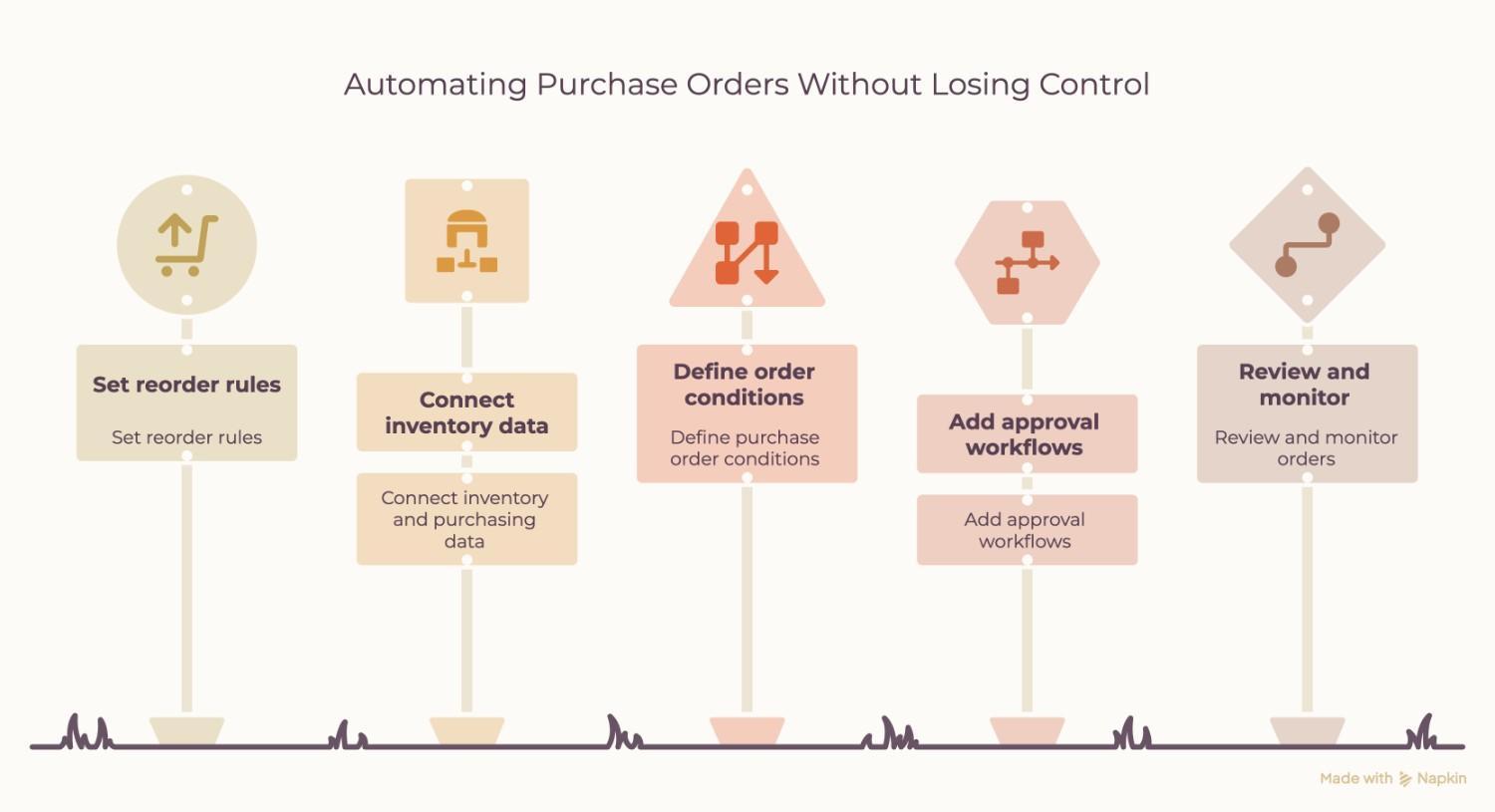
- Set reorder rules: Define stock thresholds, safety stock levels, minimum order quantities and supplier lead times for each product.
- Connect inventory and purchasing data: Integrate the ecommerce platform with the ERP or inventory management system so the automation uses updated stock levels, sales and incoming purchase orders.
- Define purchase order conditions: Configure how the system calculates order quantities and when it should generate a purchase order.
- Add approval workflows: Set approval limits based on order value, supplier or product category. For example, smaller orders may follow an automated process, while high-value orders require manager approval.
- Review and monitor orders: Track generated purchase orders, supplier confirmations, delivery dates and stock updates to identify errors or delays.
Businesses can also incorporate AI demand forecasts into the process to inform reorder quantities. The system can use forecasted demand alongside current stock and incoming deliveries, while configured purchasing rules determine what happens next.
The level of automation depends on the business. Some may only need automatically generated draft purchase orders, while others may want approved orders sent directly to suppliers.
When Should an Ecommerce Business Consider Advanced Inventory Automation?
Basic auto-reorder rules may be sufficient for businesses with stable demand and a small product range. However, advanced inventory automation becomes useful when purchasing decisions involve more variables.
An ecommerce business may need it when:
- It manages a large product catalogue across multiple sales channels.
- Demand changes frequently due to seasonal trends or promotions.
- Supplier lead times vary and affect stock availability.
- Manual purchase order preparation takes too much time.
- Fixed reorder points regularly result in excess stock or stock shortages.
- Inventory and purchasing data are spread across different systems.
In these situations, businesses can combine automatic purchase order generation with AI demand forecasting and ERP integration.
Businesses looking to move beyond manual purchasing can combine automatic purchase order generation with AI demand forecasting and ERP integration. The right setup depends on their inventory processes, supplier workflows, and existing systems.
2Hats Logic Solutions helps e-commerce businesses build custom inventory automation and AI demand forecasting solutions. We can help connect inventory and purchasing data, automate purchase order workflows, and use demand forecasts to support better stock planning.
If your team is still handling purchase orders manually or struggling with inaccurate stock planning, talk to our team about your inventory automation requirements.