

Many people are searching for a solution to bypass Google account easily. This article suggests the best ways to bypass a Google account in some easy ways and step by step, which will help the customers solve the issue and is a time-saving process.
Tip 1: FRP Basics You Should Know
Factory Reset Protection (FRP) is unfamiliar for most users due to the lack of knowledge of Android screen removal. At first, it is important to know about FRP and its function. So FRP is a security feature available on Android devices with Android version 5.1 (Lollipop) and higher. It provides a feature of built-in security that helps the user protect their device and information along with screen locks and data encryptions. When a Google account is registered on a device, the FRP is automatically enabled, and once it is activated, it will prevent the use of the device in an untrustworthy and insecure environment after a Factory Data Reset. Also, it will be disabled as soon as the Google account is removed from the device before the Factory Data Reset.
When a Factory Data Reset is performed, all the personal data is erased, including all the files and the apps downloaded to the device; all the settings return to the factory default settings. After enabling the FRP bypass, the Google account must be registered, and the user needs to enter the Google account credentials before performing a factory reset on the device.
Tip 2: How to Bypass Google Account Verification
As we all know, it is hard to find an online tool that helps users bypass Google account verification and makes the process easy for them, but the Dr.Fone tool is amazing and the best available tool; it helps to bypass FRP. The Dr.Fone tool provides a feature of Android lock screen removal that can remove the lock screen with a pattern, pin, password, and fingerprint. If the user does not remember the password or cannot enter the password due to the broken screen, the user can click through operations to bypass FRP or Android lock screen.
The Dr.Fone provides its users with various other features such as:
- If the user has lost all the Android files, including photos and messages, Dr.Fone provides Android data recovery software that helps its users recover the lost files, text messages, photos, etc.
- The amazing feature of system repair by Dr.Fone allows users to fix any kind of issues such as black screen, boot loop, bricked Android, etc. It does not require any operation skills because it is super easy to use.
- Besides recovering data, it also provides a feature to permanently erase the data and files such as photos, contacts, messages, call logs, etc.
- It comes with an amazing and unique feature that helps its users backup their phones in just one click. When the user’s device is connected or detected, this program will automatically begin to back up the data, and the new backup file will not overwrite the old one.
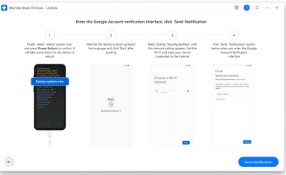
If a user is unaware of his Samsung device and cannot perform the FRP interface, click on ” Not sure the OS version?” to figure out the process.
This tool provides three different ways according to the Samsung models, showing how amazing and helpful it is for its users. The three different Samsung models are with Bixby, without Bixby, and devices with the home button. The steps are to be followed are:
- Power off the phone and connect it to the computer.

Press and hold the Volume up + Bixby + Power button simultaneously.
- After the logo appears, the device should boot in recovery mode.
- Tap the next button.

- It will show the device’s OS version with a magnified number.
Tip 3: Disable FRP to Bypass Google Account
To disable the FRP to bypass the Google account, the following steps are to be followed:
- Tap on the “settings.”