
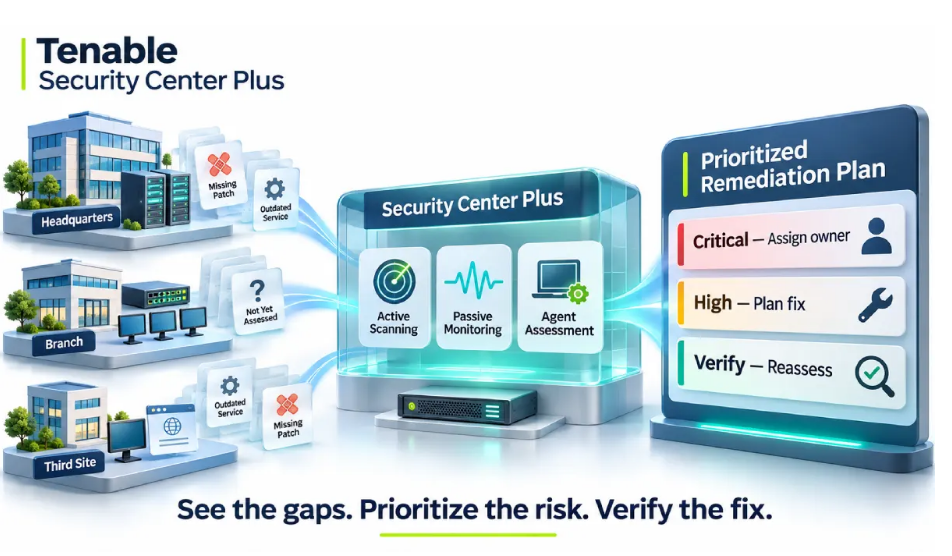
A security team is preparing its remediation plan when reports arrive from several offices. One lists missing patches on production servers, another flags outdated services on network devices, and a third contains endpoints with no recent assessment results. The team has plenty of findings, but still needs to establish which systems require attention first.
For organizations managing thousands of endpoints, servers, databases and web applications, this is a recurring challenge. Separate reports can leave teams working with different assessment dates, incomplete coverage and unclear ownership. Before assigning fixes, they need a current view of the affected assets and enough context to prioritize the work.
This is the problem vulnerability management platforms are built to solve. Tenable, the developer of Nessus, reported more than 40,000 customers at the end of 2025, including about 65% of the Fortune 500, in its annual filing. One of its enterprise offerings, Tenable Security Center Plus, brings scanning, analysis, prioritization and reporting together in a single on-premises console.
Why Periodic Scans Leave Gaps
Every new server, laptop, cloud service or network device changes the attack surface. Vulnerabilities sit in operating systems, applications, services and device configurations, and attackers can exploit them before a fix is applied. Regular assessment is therefore a basic control, but its value rests on three things: coverage, currency and context.
Coverage means finding the assets that scans do not reach, such as unmanaged devices and forgotten systems. Currency means results reflect today’s environment, not last quarter’s. Context means knowing which findings deserve attention first. Without all three, a long list of findings simply moves the problem from discovery to triage.
Three Ways to See Your Assets
Tenable Security Center Plus combines three assessment methods, each covering what the others can miss.
Active scanning uses Nessus scanners to probe systems across the network and identify vulnerabilities, missing security patches and weaknesses in devices and services. Several scans can run at the same time.
Passive monitoring uses Tenable Network Monitor to analyze network traffic, typically delivered through SPAN or ERSPAN. Because it observes traffic instead of probing hosts, it can reveal managed and unmanaged devices, software, services and protocols, along with blind spots that periodic active scans may not see.
Agent-based assessment uses Nessus Agents, coordinated through Nessus Manager, on servers and workstations. Agents assess a host in more detail from the inside and report to the central console, which helps where direct network access to every asset is impractical.
Together, these methods widen coverage in large networks and in environments where not every system can be scanned directly.
One Console Across Many Zones
Large organizations rarely run a single flat network. Security Center Plus gathers results from scanners and monitors in different network zones into one central console, where administrators manage scan policies, distribute the assessment load and assign groups of assets to particular teams or users.
Several components support this layered model. Managed scanners keep the plugins on Nessus scanners in different zones up to date, and additional Tenable Network Monitor instances extend passive visibility to more network segments. For organizations that run more than one Security Center Plus deployment, for example at separate sites, Tenable Security Center Director offers a single point of oversight across them.
The platform can be deployed on premises, and its core capabilities do not depend on a cloud service. That matters to organizations with regulatory or network-isolation requirements, which often prefer to keep security tooling inside their own infrastructure.
From Findings to Fixes
Discovery is only the first half of the job. Once vulnerabilities are identified, administrators can rank them by severity, importance and potential impact on the organization, so remediation effort goes to the risks that matter most. According to Tenable’s product documentation, the Plus tier adds the Asset Exposure Score and Asset Criticality Rating to support this kind of prioritization.
The platform also supports follow-through. Teams can track the status of each finding, receive alerts and notifications, and use tickets to route issues to the people who can fix them. A history of status changes shows whether risk is improving or getting worse over time.
Reporting turns that data into something managers can act on. Technical and management reports can show severity, impact, discovery date, remediation status and risk trends, and dashboards can be customized. Teams can also look at measures such as how quickly vulnerabilities are growing and the average time taken to fix them.
For web applications, mobile applications and APIs, the Web Application Scanning add-on can look for issues such as SQL injection and cross-site scripting. It reports details of each finding with suggested fixes, and its results can be used within the same management framework.
Govern the Platform and Connect It to the SOC
A platform that holds a complete map of an organization’s weaknesses is itself sensitive. Security Center Plus supports users with different permission levels, granular access to reports and templates, and integration with authentication services and strong multifactor mechanisms. User activity is recorded, so the organization can answer who did what, and when.
Vulnerability data is most useful when it sits beside other security signals. Through add-ons and APIs, Tenable data can be exchanged with Splunk. The Tenable Add-On for Splunk collects and normalizes the data, and the Tenable App for Splunk provides dashboards, so analysts can view asset and vulnerability context next to other events and use Splunk’s analytics and alerting.
Match the Licensing Model to Your Asset Footprint
Technical design and licensing are best planned together. Questions that usually shape scope include:
How many assets need to be assessed, and how fast is that number growing?
Which systems are involved: servers, endpoints, network devices, cloud instances, web applications?
Will you assess with active scans, passive monitoring, agents or a combination?
Is the deployment on premises, cloud-managed or hybrid?
Do you need add-ons such as web application scanning, additional consoles or Director for multi-site oversight?
Tenable licensing is subscription-based, with typical terms of one, three or five years, and it is generally asset-based. The exact metric differs by product and edition, so confirm how yours counts assets before you size it. For Security Center, Tenable’s documentation describes licenses tied to a maximum number of active assets identified by IP address or UUID, with an asset typically counting once it has been assessed. Isolated or air-gapped environments follow a separate activation process, which is worth raising early.
Organizations comparing Tenable licensing options through GoLicense can bring these answers to a quote request. With the asset count, deployment model, scanning approach and add-ons defined first, the review of your inventory and the recommendation of a licensing model can start from real numbers rather than estimates.
The practical test is whether teams can turn findings from different parts of the organization into a coordinated remediation plan. Can they identify gaps in coverage, prioritize affected systems, assign owners and verify that fixes worked? Combining current assessment data, centralized analysis and clear reporting helps make those decisions repeatable—and gives each remediation cycle a measurable outcome.