
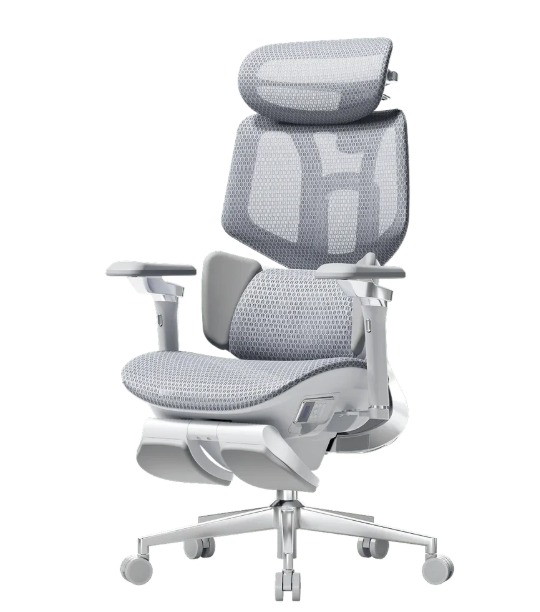
Modern work environments demand more from office furniture than ever before. Whether working from home, managing a corporate workspace, or spending hours at a computer, people often remain seated for extended periods. While traditional office chairs offer basic height adjustments and reclining features, they do not always provide the personalized support needed as the body changes position throughout the day. This is where adaptive lumbar support is transforming the modern seating experience.
Unlike conventional lumbar systems that require users to manually adjust their position, adaptive technology is designed to respond to movement and maintain more consistent contact with the lower back. By combining ergonomic engineering, intelligent mechanisms, and advanced sensing technology, a smart ergonomic chair can provide a more personalized seating experience.
Brands such as HBADA are exploring these innovations through ergonomic seating solutions that move beyond conventional adjustment systems. Understanding how adaptive lumbar support works can help professionals make better decisions when choosing an office chair for everyday use.
1. Understanding the Limitations of Traditional Lumbar Support
The lumbar region refers to the lower portion of the spine, which naturally curves inward. Maintaining comfortable support around this area is an important consideration when designing ergonomic office furniture.
Traditional office chairs generally use fixed lumbar cushions or manually adjustable support panels. Although these features can improve comfort, they have certain limitations.
For example, a manually adjustable lumbar support system usually requires users to change the height, depth, or position of the support themselves. Once adjusted, the system generally remains in the same position until someone makes another adjustment.
However, people rarely maintain one sitting position throughout the workday.
An individual might lean forward while typing, sit upright during a video meeting, shift sideways while reading, or recline during a short break. A fixed support mechanism cannot automatically respond to all these movements.
This creates a gap between the user’s changing posture and the chair’s support position.
Adaptive lumbar support addresses this limitation by introducing mechanisms that respond to body movement instead of relying entirely on manual adjustments.
2. What Is Adaptive Lumbar Support?
Adaptive lumbar support is an ergonomic seating technology designed to adjust or reposition lower-back support as a person changes their sitting posture.
Rather than functioning as a stationary cushion, an adaptive system works to maintain a more suitable relationship between the chair’s backrest and the user’s lumbar region.
Depending on the chair’s design, this technology may use flexible mechanical components, pivoting support panels, moving lumbar pads, sensors, electronic controls, or motorized adjustment systems.
The objective is to provide consistent, responsive support throughout different sitting positions.
There are two important approaches to adaptive lumbar technology:
Mechanical adaptive support: These systems use flexible structures, pivoting wings, or synchronized mechanisms to follow the body’s movements. They can respond to changes in posture without necessarily requiring electronic components.
Intelligent or AI-assisted support: More advanced systems use sensors, processing units, and precision motors to detect posture changes and automatically reposition lumbar support.
Both approaches aim to make sitting more responsive and personalized, although their underlying mechanisms and capabilities differ.
3. How Does Adaptive Lumbar Support Work?
The technology behind adaptive lumbar support varies between manufacturers and chair models. However, advanced systems generally follow a process involving movement detection, response processing, and physical adjustment.
Step 1: Detecting Changes in Sitting Posture
The first stage involves recognizing when the user’s body changes position.
In an intelligent smart office chair, sensors can monitor movement and changes in posture. Depending on the design, these sensors may detect shifts in lumbar position, body pressure, or other movement-related information.
For example, when someone leans forward to work on a computer, the distance and contact relationship between their lower back and the backrest may change.
A responsive support system can use this information to determine whether its current position needs adjustment.
Mechanical adaptive systems approach the same challenge differently. Their flexible or pivoting components respond directly to changes in body position and contact pressure.
Step 2: Processing the Information
In an AI-powered chair, collected sensor information is interpreted by an electronic control system.
The processing system evaluates changes in the user’s position and determines whether the lumbar mechanism should move forward, backward, or otherwise adjust its support position.
This is one of the key differences between a conventional adjustable chair and an advanced smart ergonomic chair.
Traditional designs depend largely on the user to recognize discomfort and make adjustments. Intelligent designs aim to respond automatically, reducing the need for repeated manual intervention.
Step 3: Adjusting the Lumbar Mechanism
Once the system identifies a change that requires a response, the physical support mechanism adjusts accordingly.
Depending on the chair, this movement may involve flexible lumbar panels, articulated support wings, sliding components, or motorized mechanisms.
For instance, a motorized lumbar tracking system can reposition its support pad as the user leans forward or returns to an upright position.
This allows the support structure to follow the user’s movements more closely than a fixed lumbar cushion.
Step 4: Maintaining Responsive Support
The process does not end after one adjustment.
People naturally move throughout the day, so an advanced adaptive system is designed to respond repeatedly to changing sitting positions.
The result is a seating experience that can accommodate different working activities without requiring users to constantly stop and readjust their chairs.
4. The Role of AI and Smart Technology in Modern Office Chairs
Artificial intelligence is becoming an increasingly interesting part of ergonomic furniture design.
A smart ergonomic chair can integrate sensors, processing technology, and motorized components to make seating adjustments more responsive.
HBADA’s X7 series provides an example of this approach.
According to the product information on the brand’s website, the HBADA X7 uses AI-powered lumbar tracking to detect posture changes, process movement information, and reposition its lumbar support through a precision linear motor.
The system is designed to respond as users move between forward-leaning, upright, and reclined positions.
The X7 also offers ten tracking-intensity levels, allowing users to customize how actively the lumbar support follows their movements.
Other features include:
- AI-powered automatic lumbar tracking.
- Electric forward-and-backward lumbar adjustment.
- Adjustable lumbar support height.
- An 8D bionic massage system.
- Three-level lumbar heating.
- A 4D dual-axis headrest.
- A multifunctional armrest system.
These features demonstrate how a modern smart office chair can combine automatic support with additional comfort-oriented technologies.
The important distinction is that intelligent tracking is not simply another name for manual adjustability. It introduces a system designed to respond to the user rather than waiting for the user to operate a control.
5. Three-Zone Support: A More Personalized Ergonomic Approach
Not every adaptive lumbar system relies on artificial intelligence. Some ergonomic chairs use sophisticated mechanical engineering to provide dynamic support.
Three-zone adaptive lumbar support is one example.
This approach generally divides the lower-back support structure into three functional areas: a central lumbar section and two side-support sections.
The central component provides support around the lumbar curve, while the side sections help contour the support structure around the user’s lower back.
As the person moves, the flexible or pivoting components can accommodate different body positions.
The advantages of this design include:
More natural movement: Flexible support components can follow changes in body position instead of remaining completely rigid.
Better contouring: Multiple support zones can create a more individualized contact area.
Reduced adjustment interruptions: Responsive mechanical components can accommodate movement without requiring users to repeatedly operate adjustment controls.
HBADA’s E3 series illustrates this approach through its three-zone adaptive lumbar support system. Its design incorporates a central support pad and pivoting side wings to accommodate different sitting positions.
This provides an interesting comparison with the X7 series, which emphasizes sensor-based AI lumbar tracking.
Both approaches pursue responsive ergonomic support, but they achieve it through different engineering methods.
6. Why Adaptive Lumbar Support Matters During Long Working Hours
The importance of ergonomic seating becomes more noticeable when people spend several hours working at a desk.
Sitting continuously in one position can contribute to stiffness, discomfort, and fatigue. Although no office chair can eliminate every problem associated with prolonged sitting, a properly configured ergonomic chair can make maintaining comfortable support easier.
Adaptive lumbar support offers several potential advantages.
Accommodates Different Working Positions
Office work involves multiple activities. Typing, reading, attending meetings, and taking breaks can all involve different sitting positions.
Adaptive support is designed to accommodate these transitions rather than depending on one fixed position.
Reduces Repeated Manual Adjustments
Traditional lumbar systems may require frequent repositioning, particularly when users switch between different activities.
Automatic or mechanically responsive support can reduce the need for these repeated adjustments.
Encourages More Personalized Seating
People have different body proportions, preferences, and sitting habits.
Adjustable support intensity, lumbar height, and forward-and-backward positioning can help create a more personalized experience.
Complements Other Ergonomic Features
Lumbar support is only one part of a complete seating system.
Seat height, seat depth, backrest movement, armrest positioning, and headrest adjustment also influence overall comfort.
A well-designed smart ergonomic chair brings these elements together to support a more balanced sitting experience.
7. HBADA: Bringing Adaptive Ergonomics Into Everyday Workspaces
As ergonomic furniture continues to evolve, HBADA is developing chairs that combine traditional ergonomic principles with more advanced support technologies.
The brand’s product range demonstrates different approaches to adaptive seating.
The E3 series focuses on mechanical adaptability through its three-zone lumbar support architecture. Its flexible support structure is designed to accommodate changes in posture while offering additional adjustment options.
The X7 series takes a more technology-driven approach. Its AI lumbar tracking system uses posture sensing, intelligent processing, and motorized movement to reposition lumbar support automatically.
For people interested in exploring these technologies, the smart ergonomic office chair range provides an example of how intelligent tracking can be incorporated into contemporary office seating.
Those researching ergonomic furniture can also visit HBADA to explore its different chair models, specifications, and support features.
Rather than focusing exclusively on appearance, these designs emphasize the relationship between body movement, adjustable support, and everyday usability.
8. What Should You Consider Before Buying a Smart Ergonomic Chair?
Although adaptive technology offers several interesting advantages, choosing the right chair requires more than looking at its technological features.
Here are some important considerations.
- Lumbar adjustment range
Check whether the lumbar mechanism supports height and depth adjustments. A wider adjustment range can make it easier to position the support according to your body proportions.
- Adaptive mechanism
Determine whether the chair uses mechanical flexibility, synchronized movement, or sensor-based automatic tracking. These systems provide different experiences and should not be treated as identical.
- Overall adjustability
Look beyond lumbar support. Seat depth, seat height, armrests, headrest positioning, and recline functionality all contribute to a comfortable seating setup.
- Breathable materials
Mesh backrests can improve airflow, which may be particularly useful during extended working sessions.
- Build quality
Consider the frame materials, structural design, weight capacity, warranty, and available customer support.
- Your daily working habits
Someone who spends most of the day typing may prioritize responsive upright support, while someone who frequently reclines may prefer a chair with synchronized reclining and adjustable headrest features.
Ultimately, the best choice depends on how well the chair’s design matches your body, workspace, and daily activities.
9. The Future of Adaptive Ergonomic Seating
The development of adaptive lumbar technology represents a broader shift in office furniture design.
Traditional chairs were primarily designed around static adjustments. Users selected a position, configured their chair, and remained responsible for making further changes.
Modern ergonomic technology is moving toward more responsive systems that accommodate natural movement.
Future developments may include increasingly sophisticated posture sensing, more precise automatic adjustments, improved personalization, and better integration between different seating components.
However, the goal should not be to eliminate movement or force users into one supposedly perfect posture.
Healthy workstation habits still involve changing positions, taking regular breaks, and maintaining an appropriately configured workspace.
The most promising ergonomic designs will be those that support natural movement while making everyday sitting more comfortable and adaptable.
Conclusion
Adaptive lumbar support represents an important development in modern ergonomic seating. By moving beyond fixed cushions and repeated manual adjustments, these systems aim to provide more responsive support as people change their sitting positions.
Whether through flexible three-zone mechanical structures or advanced AI-powered tracking, the technology offers new possibilities for creating personalized office seating experiences.
HBADA’s E3 and X7 series demonstrate how different engineering approaches can address the same challenge: making ergonomic support more responsive to the human body.
As workplaces continue to evolve, the smart ergonomic chair is becoming more than a piece of office furniture. It represents a shift toward intelligent, adaptable seating designed around the way people actually work and move throughout the day.
Previously in Latest News: How to Lay Centipede Sod in Sandy Coastal Soil