
Shopping for a child’s first 3D printer isn’t about chasing top millimeter-per-second speeds or industrial specs. What matters is whether the machine fits your child’s age, how much supervision you can provide, and where it sits in your home. In family maker spaces, a safer printer never means an unsupervised printer. As desktop additive manufacturing matures, the buying criteria for the Best 3D Printer for Kids 2026 have shifted away from basic print reliability toward beginner-friendly software and physical isolation from hot nozzles and moving belts.
This guide evaluates fused filament fabrication (FDM/FFF) machines through practical safety benchmarks, emission data, and household routines. Resin (SLA/MSLA) printers are excluded because liquid photopolymers, isopropyl alcohol washes, and UV curing introduce chemical hazards unsuitable for children.
1. Quick Picks: Best 3D Printer for Kids 2026
Children vary widely in motor control, hazard awareness, and software comfort between ages five and fifteen. To narrow down the Best 3D Printer for Kids 2026, we evaluated physical shielding, air filtration, low-voltage protection, automatic calibration, and beginner-friendly software across seven popular models.
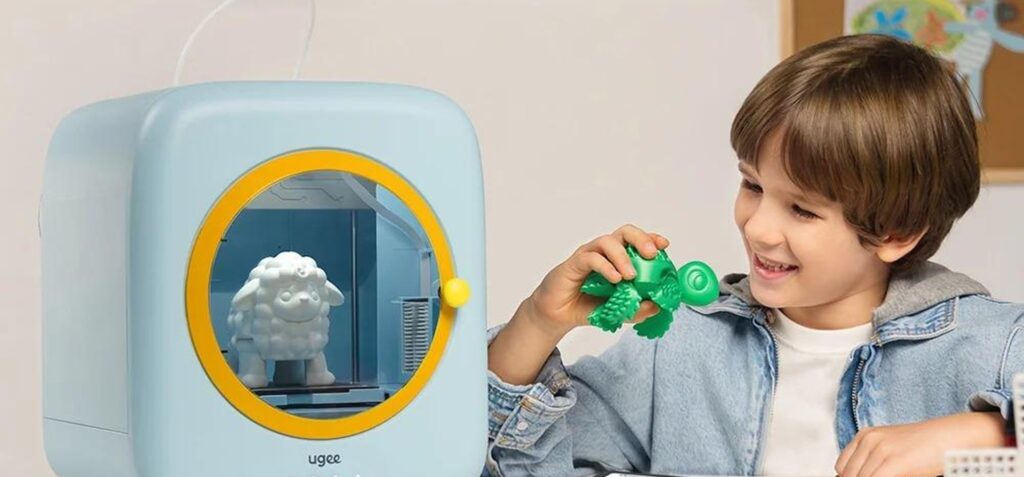
ugee Funbox 3D printer for kids
Designed specifically for young makers, the ugee Funbox pairs a 360° fully enclosed frame with a 12V low-voltage architecture and a cool-touch magnetic build plate.
It includes built-in H12 HEPA + activated carbon filtration, quiet 46 dB operation, auto-leveling, and 500 mm/s printing speeds. Kids get AI modeling (text, voice, photo, doodle), 14,000+ completely free, constantly growing 3D models in the UFun App, U-PRINT desktop software for skill progression, and ASTM F963-23, EN71, EN62115, and UL GREENGUARD certifications.
Limitations to consider: Its child-centric build chamber focuses primarily on standard PLA projects rather than large-scale engineering prints.
Toybox Alpha Four:
A compact desktop unit built around a simplified mobile catalog that lets younger children select and start prints without touching complex slicing menus.
Its straightforward app workflow removes traditional software friction for early elementary users, allowing quick one-touch starts on small desk spaces.
At the same time, Its 75 × 80 × 90 mm build volume severely restricts project size, its open-frame structure lacks protective doors or side panels around moving parts, and unlocking many catalog models requires a paid membership rather than free library access.
AOSEED X-MAKER JOY:
An enclosed, PLA-only starter printer paired with basic block-based modeling tools tailored for early elementary classroom or home introductions.
The enclosed outer shell provides basic physical separation from the hotend, while its visual block-building interface helps young beginners grasp simple 3D shapes easily.
But Its lower maximum printing speed (around 300 mm/s) makes medium-sized toys take noticeably longer to finish, and it lacks an integrated HEPA and activated carbon air filtration system for indoor air management.
Bambu Lab A1 mini:
A high-speed cantilever printer featuring a 180 × 180 × 180 mm³ build volume, automatic bed leveling, active flow calibration, and speeds up to 500 mm/s.
Older students learning CAD tools like Tinkercad or Fusion 360 benefit from fast print turnarounds, reliable first-layer automation, and consistent extrusion quality. However, It is not designed specifically for young kids—its open-frame design leaves hot nozzles and moving belts exposed, and its advanced Bambu Studio slicing workflow presents a steep learning curve for beginners.
Flashforge Adventurer 5M Pro:
A full-enclosure desktop printer equipped with internal air circulation, exhaust filtration, and a roomy 220 × 220 × 220 mm build volume for multi-user environments.
The enclosed chassis blocks curious hands and pets from moving belts, while dual filtration ducts help contain odors and particles in shared rooms.
A few drawbacks remain: Engineered as a general-purpose desktop workhorse rather than a kid-focused machine, its interface and multi-material settings create a higher learning curve for younger children to operate independently.
Anycubic Kobra S1:
Built on a rigid, enclosed CoreXY frame, this versatile machine handles both student STEM assignments and household prints when configured with low-odor PLA profiles.
Its enclosed CoreXY architecture maintains structural stability at higher speeds and isolates internal moving parts from busy family spaces.
Limitations to consider: Because it is not tailored around a child's user experience, initial hardware setup and print parameter adjustments are noticeably more complex, creating a higher entry barrier for young learners.
Original Prusa MINI+:
Sold as a semi-assembled open-frame kit, this printer invites parents and older teens to bolt together sub-assemblies and route cables before starting their first print.
Open hardware documentation, input-shaping firmware, and straightforward component repairability make it a rewarding platform for hands-on mechanical STEM education.
However, It demands substantial upfront assembly time before printing, lacks a protective enclosure around hot and moving parts, and requires close adult supervision in homes with younger siblings.
2. How Kid-Friendly 3D Printers Evolved for the Best 3D Printer for Kids 2026
Ten years ago, entry-level desktop 3D printers behaved like workshop prototypes. Owners spent hours turning thumbscrews for four-point manual bed leveling, adjusting Z-offsets with copier paper, and calibrating extruder steps per millimeter. Parents often acted as full-time technicians while kids lost patience waiting for a single successful print.
From Manual Tuning to Sensor Automation
Modern home printers have replaced manual adjustments with automated sensor arrays. Units like the Bambu Lab A1 mini and Flashforge Adventurer 5M Pro run multi-point mesh bed leveling automatically before each job, pairing direct-drive extruders with flexible textured PEI plates so first layers stick without glue sticks. Even classic open designs like the Original Prusa MINI+ now use input-shaping firmware to suppress vibration artifacts at higher speeds.
Streamlined Software Paths
Software interfaces have also split into two approachable paths. Child-focused ecosystems like the ugee Funbox take accessibility even further: its UFun App provides 14,000+ completely free, continuously growing 3D models alongside AI modeling tools (turning text, voice, photos, or doodles into 3D files) with one-click printing—avoiding the paywalls found in subscription-locked catalogs like Toybox. Even better, families can transition smoothly to U-PRINT desktop software when kids are ready to learn real slicing controls, bridging the gap between beginner galleries and advanced desktop suites like Bambu Studio or PrusaSlicer.
3. How FDM/FFF Kid Printers Work in the Best 3D Printer for Kids 2026
Understanding what happens inside the print chamber helps kids treat the machine as a manufacturing tool rather than a magic box. Nearly all kid-appropriate printers use material extrusion—known as FDM (Fused Deposition Modeling) or FFF (Fused Filament Fabrication), which share the same standardized process under ISO/ASTM 52900 guidelines.
Layer-by-Layer Deposition and Slicing
During a print, a stepper motor feeds 1.75 mm thermoplastic filament into a heated metal block. The nozzle melts the plastic and traces paths across the X and Y axes using coordinates generated by slicing software. After each slice, the Z axis rises by one layer height—typically 0.1 mm to 0.2 mm—stacking hundreds of fused layers from the bottom up into a solid object.
Why PLA Remains the Standard Filament for Kids
Polylactic acid (PLA) is the clear default for family use. Derived largely from fermented plant starches, PLA prints at lower nozzle temperatures between 190°C and 220°C with minimal thermal shrinkage, staying flat on a 55°C to 60°C bed without cracking. High-temperature filaments like ABS or ASA—which enclosed units like the Anycubic Kobra S1 can handle—require 230°C to 260°C nozzles, 90°C to 110°C beds, and release strong odors alongside higher volatile organic compounds (VOCs).
Still, PLA does not mean zero emissions. Safety studies show that heating PLA releases trace lactide (around 4 to 5 micrograms per minute) and ultrafine particles (UFPs smaller than 100 nanometers). Even though PLA emissions are roughly ten times lower than ABS, keeping room air moving remains essential.
Five Tasks a Kid-Friendly Printer Should Automate
Bed leveling and Z-offset: Measuring nozzle-to-bed clearance automatically without manual thumbscrews.
Thermal and retraction presets: Matching nozzle heat and pull-back distances to prevent plastic stringing.
Support generation: Detecting overhangs steeper than 45 degrees and building breakaway supports.
First-layer adhesion aids: Adding a thin brim around narrow bases so tall models stay anchored.
Guided filament loading: Heating the hotend and driving feed gears automatically to prevent jams.
4. Safety Principles for the Best 3D Printer for Kids 2026
Evaluating the Best 3D Printer for Kids 2026 requires addressing two distinct hazard areas: physical contact injuries and indoor air exposure.
Thermal and Mechanical Isolation
Nozzles routinely reach 190°C to 220°C, while heated beds sit at 55°C to 65°C. Touching an active nozzle causes an immediate second-degree burn. On open-frame units like the Bambu Lab A1 mini or Original Prusa MINI+, moving beds, belts, and lead screws also create pinch points for small fingers or loose sleeves. Every home should enforce one strict rule: nobody reaches inside the print area while the machine is running or during its 15-minute cooldown window. In homes with toddlers or pets, enclosed printers like the ugee Funbox, AOSEED X-MAKER JOY, or Flashforge Adventurer 5M Pro provide vital physical separation.
Air Quality and Room Placement Rules
A clear plastic door blocks fingers and drafts, yet ultrafine particles still escape panel seams unless air passes through dedicated filtration—such as the built-in H12 HEPA + activated carbon filtration system on the ugee Funbox or the dual ducts on the Adventurer 5M Pro—or vents outdoors.
Keep printers out of bedrooms: Never run overnight prints in a child’s sleeping area or a windowless closet.
Maintain active airflow: Place the unit near an open window in a living room or classroom, or run a nearby HEPA air purifier.
Use lower PLA temperatures: Run PLA near the lower end of its temperature range and power down heaters promptly after printing.
Adult-Child Role Division
Kid-led steps: Browsing model catalogs, building simple shapes in beginner CAD apps, watching progress through the window, and painting finished parts.
Adult-led steps: Loading filament spools, checking first-layer adhesion, flexing build plates, clipping support structures with flush cutters, and clearing nozzle clogs only after the machine is unplugged and cool.
5. Workflow: From Model to Finished Toy or School Project with the Best 3D Printer for Kids 2026
A repeatable routine prevents wasted filament and teaches kids how real engineering teams move from digital files to finished prototypes.
Step 1: Model Screening and Geometry Checks
Kid-centric platforms like the ugee Funbox give families access to 14,000+ completely free, continuously updated models inside the UFun community (without requiring paid memberships for full access), while older students using U-PRINT, Bambu Studio, or PrusaSlicer can also import STL or 3MF files from Printables, MakerWorld, or Thingiverse. Before slicing, inspect the geometry together: ensure toys for younger siblings lack detachable pieces under 3 cm that pose choking risks, and confirm school science models have wall thicknesses of at least 1.2 mm (three passes of a 0.4 mm nozzle) so thin walls do not snap during removal.
Step 2: Thirty-Second Pre-Print Inspection
Before starting a job, adults should verify three items:
Clean build surface: Wipe away stray filament and skin oils on the PEI sheet so PLA corners stick properly.
Tangle-free spool: Confirm the filament feeds smoothly without overlapping loops.
Reasonable print time: Keep daytime jobs between one and three hours so an adult remains home until completion.
Step 3: First-Layer Observation and Safe Part Removal
The first three to five minutes determine print success. Watch the nozzle lay down initial perimeter lines; if plastic fails to stick or bunches around the hotend, cancel immediately to avoid encasing the heater block. Once finished and the bed cools below 40°C, an adult can flex the magnetic plate to release the part and smooth rough edges with fine sandpaper before handing it over for play or school display.
Conclusion
Choosing the Best 3D Printer for Kids 2026 comes down to matching hardware safeguards with your child’s growing independence. Whether you start with an enclosed, guided desktop unit for young beginners or step up to a faster open-frame system like the Bambu Lab A1 mini or Original Prusa MINI+ for middle-school CAD projects, pairing low-temperature PLA filament with steady room airflow and clear adult oversight turns 3D printing into a reliable creative outlet at home.