
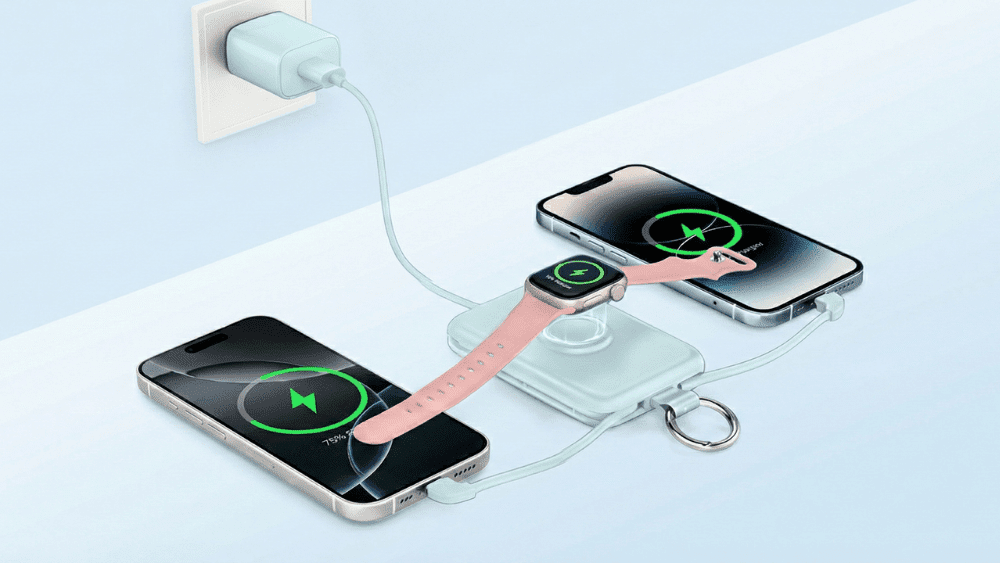
Apple Watch users often lose or damage their chargers, but there are other ways to charge their devices. The short answer is: Use a specialized 2-in-1 power bank, a MagSafe Duo, or plug your watch cable directly into an iPhone 15/16/17.
This guide details 5 hardware solutions, along with tips on how to charge without a wall adapter and safety precautions to protect your battery.
5 Ways to Solve How to Charge Apple Watch Without Charger?
1. Use the Official Apple MagSafe Duo Charger
The MagSafe Duo is a reliable official accessory that features a dedicated magnetic puck for the watch alongside an iPhone charging pad. It serves as an excellent backup, allowing you to charge both devices from a single wall adapter. Note that it requires a high-wattage power brick to charge both devices efficiently at the same time.
2. Use a 2-in-1 Portable Power Bank
The most efficient method to minimize cable clutter is a specialized portable charger like the RORRY D-Series.
- Wireless Convenience:It features an integrated magnetic charging module, allowing you to wirelessly charge your Apple Watch anywhere without bringing an extra cable.
- Dual Charging:With a built-in cable for your phone, you can charge both your iPhone and Apple Watch simultaneously from one compact device, making it perfect for on-the-go use.
3. Use iPhone Reverse Wired Charging (iPhone 15–17 Series)
If you own an iPhone 15, 16, or 17, you can use the phone’s battery to charge your watch via reverse wired charging. Simply plug your Apple Watch magnetic cable (USB-C version) directly into the iPhone’s USB-C port. The phone will function as a power bank and transfer energy to the watch.
4. Locate a Public Charging Station
In an emergency, you can utilize charging stations in specific public spaces. Official Apple retail stores have demo tables with active charging pucks available for quick top-ups. Additionally, many high-end gyms and modern hotels now equip cardio machines and bedside alarm clocks with integrated Apple Watch magnetic chargers.
5. Use a 3-in-1 Mobile Wireless Charging Station
Whether for travelers or home use, a foldable 3-in-1 charging station is a superior alternative to loose cables. These devices unfold to provide dedicated charging spots for an iPhone, AirPods, and Apple Watch. By plugging this single station into a wall outlet or laptop, you can power all your Apple devices without needing the original watch cable.

How to Charge Apple Watch Without a Power Adapter?
If you have the cable but lack the wall plug, use these common USB power sources:
- Third-Party Adapters:Any standard USB wall adapter from other reputable brands works perfectly fine.
- Computer or Laptop:Plug the cable into any active USB port. Ensure the laptop is awake, as sleep mode often cuts power to the ports.
- Portable Power Bank:Choose a portable charger or MagSafe Power Bank that supports charging multiple devices, so you can charge your devices even without an adapter.
- Car USB Port:Most modern vehicles have USB media or charging ports that provide sufficient current to charge the watch while driving.
How to Charge Your Apple Watch Safely?
Adhere to these safety protocols to preserve battery health:
- Choose Reputable Brands:Use Apple-certified (MFi) brands or trusted manufacturers like RORRY. Generic chargers often lack voltage protection, which can damage the battery.
- Avoid Extreme Heat:Never charge in direct sunlight or hot cars. Lithium-ion batteries degrade rapidly in high temperatures.
- Keep Surfaces Clean:Dust or debris on the magnetic charger or watch back can interfere with induction and cause overheating.
- Ensure Stability:Place the charger on a flat surface. A loose connection causes constant disconnection/reconnection, generating unnecessary heat.
I’ve already learned how to charge my Apple Watch, but it’s also important to learn whether I can charge the Apple Watch while simultaneously charging the power bank, and how to charge a power bank.
Conclusion
From using your iPhone’s USB-C port to finding public outlets, you have several effective options to stay powered. However, for the most streamlined experience, a dedicated solution like the RORRY D-Series is ideal, as it completely eliminates the need for extra cables. By following these five methods and safety tips, you can ensure your Apple Watch never runs out of power.
FAQs
What is the “secret port” on the Apple Watch?
It’s a hidden 6-pin diagnostic port on older models (Apple Watch Series 6 and earlier) used only by Apple technicians for repairs and diagnostics—not for consumer charging. It was removed starting with Series 7 and later models.
Can an iPhone Air charge an Apple Watch?
Yes, but only via cable. iPhone 15 and later models (including iPhone Air) support wired reverse charging through USB-C (up to ~4.5W). No wireless reverse charging for Apple Watch is supported on any iPhone.
What is reverse wireless charging?
It’s the feature that lets a phone wirelessly charge accessories placed on its back. iPhones do not support this for Apple Watch (only wired reverse charging is available on USB-C models).
Can I use an iPad to charge my Apple Watch?
Yes. Plug the Apple Watch Magnetic Charger directly into a USB-C iPad’s port (iPad Pro 2018+, Air 4+, mini 6+, iPad 10+).
How do I know if a dead Apple Watch is charging?
Look for a red lightning bolt icon—it means the watch is charging from very low/zero battery. If the screen stays black, leave it on the charger for at least 30 minutes until the icon appears. Once charging, it may turn green or show an animation.